How One Ecommerce Store Owner 5x'd Shopify Revenue in Under Six Months Using Google Ads and Performance Max

I recently sat down with Valerio Bernabo, the owner of Trade Hero Australia, an ecommerce business that sells high-ticket B2B tools and machinery to construction businesses. Valerio came to me back in October 2025, and within six months, he had 5x'd his Shopify revenue using Google Ads. In fact, sales increased so dramatically that he ran out of stock.

I wanted to share Valerio's story because the mistakes he was making before we worked together are ones I see constantly, and the fixes are straightforward enough that you could apply most of them to your own account this week.

June 2026 Ecommerce Ads Roundup: ChatGPT Ads, Google Universal Cart, Agentic Media Buying, and the DSA Sunset

ChatGPT now has ads inside it, and your products might already be showing up in there whether you like it or not. That chat box millions of people open every single day has just turned into a brand new place to sell your stuff. That is the headline this month, but there are four more stories worth your attention, including a billion-dollar brand that handed its entire ad budget to an AI. Let me run through all five.

How to Optimise Google Shopping Product Titles With AI (Free Plugin + Step-by-Step Setup)

Your Google Shopping product titles are probably holding you back. They are the single most important factor Google uses to match your products to the keywords people search for in Google Shopping. Better titles mean more keywords targeted, which means more clicks, and more sales.

But optimising hundreds or thousands of product titles by hand? It is a real pain. That is exactly why I built a free AI plugin called the Product Title Optimiser. I have applied this to client accounts and seen up to a 2x increase in shopping traffic right off the bat.

It is completely automatic, easy to set up, and completely free. Let me walk you through exactly how it works and how to set it up from scratch.

What the Product Title Optimiser Actually Does

The Product Title Optimiser is a free plugin for Claude Cowork, which is Anthropic's AI agent platform for business users. Once installed, it connects to your Google Ads account, pulls your actual search term data, researches keywords from multiple sources and tools, and generates optimised titles automatically, plus a research report so you can check its workings.

Once everything is set up, you literally just type "optimise my product titles" and it handles the rest.

This is not the kind of AI chatbot you are probably used to. Claude Cowork is part of a new generation of AI agents that can connect to tools, download data, and complete real work on your behalf. We are talking about work that would take a human days, possibly weeks, and Claude Cowork will finish it in minutes.

Step 1: Download and Set Up Claude Desktop

First, head to claude.com/download and install the Claude desktop app. Create an account if you need to, log in, and you will land on a screen that probably defaults to chat mode.

Here is the important bit: tab over to Cowork. This is what turns Claude from a regular chatbot into a proper AI agent that can do real work for you.

Step 2: Download the Plugin

Head to the GitHub page and click the Code button, then Download ZIP. That is the plugin file you will upload shortly.

If you need a written version of the full tutorial, it is all in the README file on that same GitHub page, so you have a handy cheat sheet to guide you through.

Step 3: Connect Your Google Ads Data via Go Marble

Before uploading the plugin, you need to set up Go Marble, a free tool that bridges Claude Cowork and your Google Ads data.

Head to Go Marble, log in, and create an account using the same Google account you use for your Google Ads campaigns. Once you are in, click Connect your data source and select Google Ads. Authenticate with the same Google Ads account, then make sure the correct ad account is selected.

The key point here: if you only connect one data source (your Google Ads account), Go Marble is free forever. That is specifically why I chose it as the connector.

Step 4: Install the Plugin in Claude Cowork

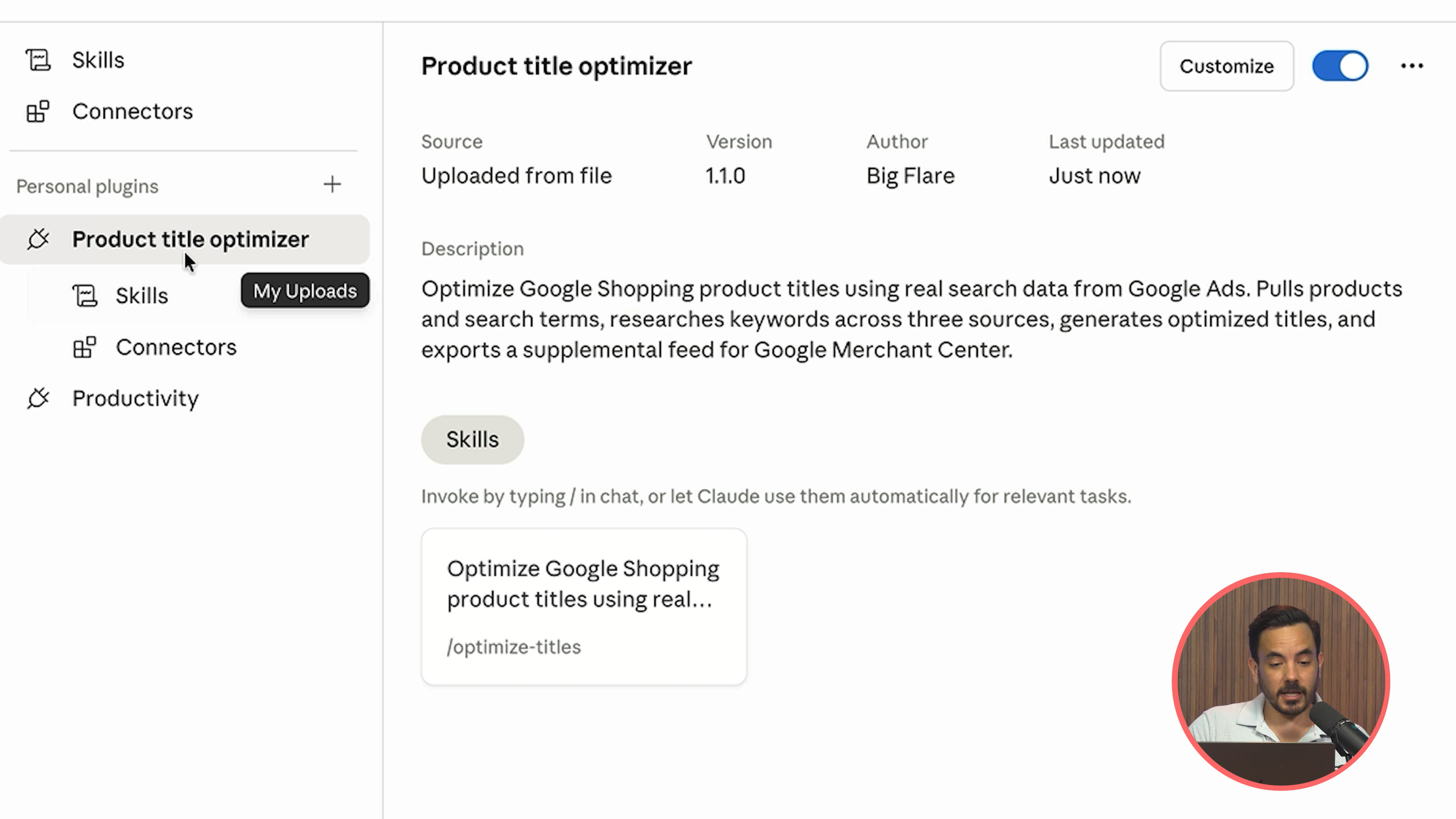
Back in Claude Cowork, click Customise in the sidebar, then navigate to Plugins. Click the plus button, select Create Plugin, then Upload Plugin, and find that ZIP file you downloaded from GitHub.

Step 4: Install the Plugin in Claude Cowork

The plugin consists of two things: a skill and a connector. The skill is essentially a big prompt template I have already created for you (you can actually read the exact prompt if you want to review it in detail). The connector is for Go Marble.

Navigate to Connectors within the plugin settings and you will see the Go Marble connector packaged as part of the plugin. Click Install, then Add, then Connect. It will take you to a web page where you are already logged into Go Marble. Once connected, click the link to return to Claude, and you should see all the tools listed, confirming everything is connected and ready.

Step 5: Run the Optimiser

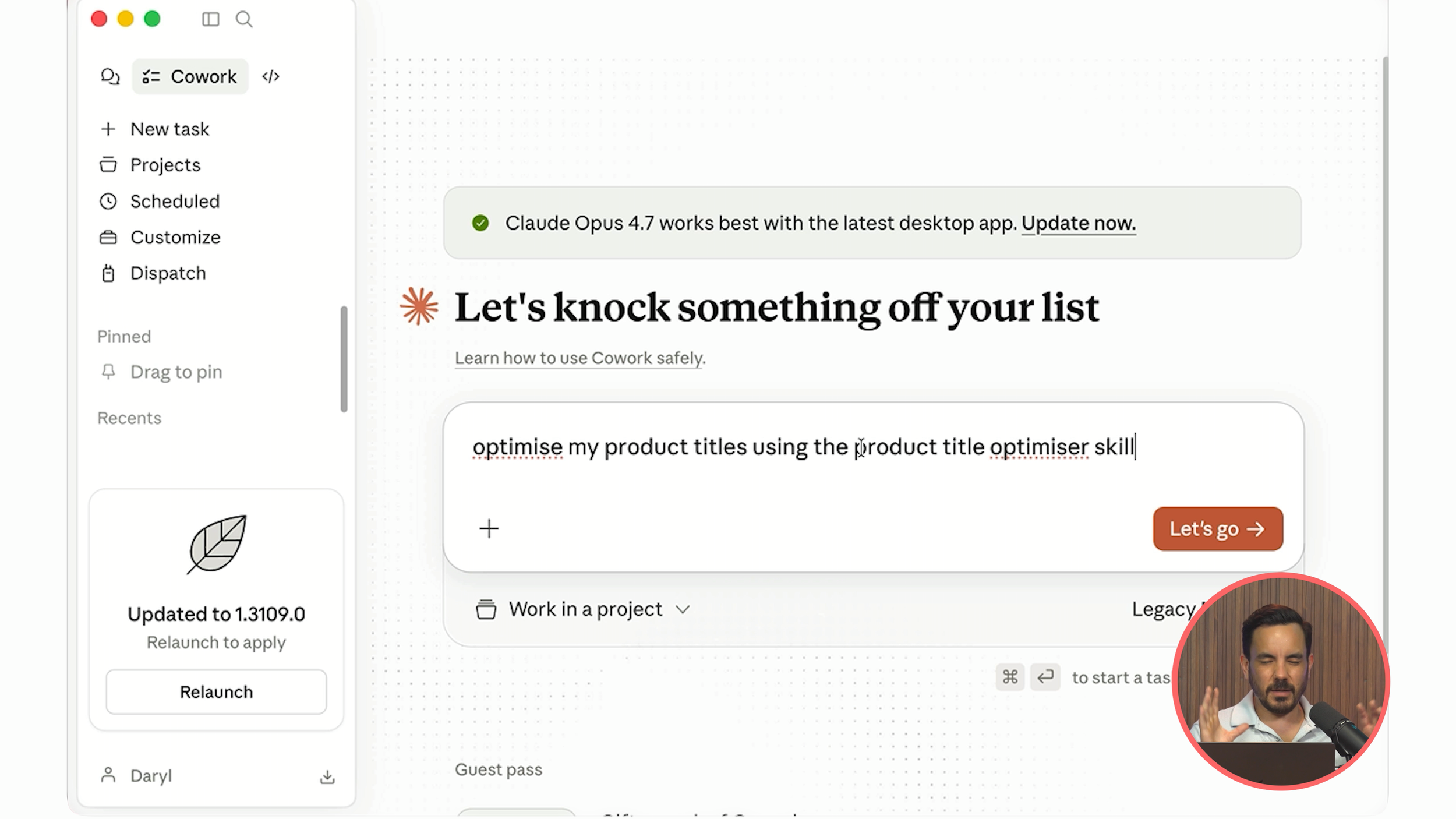
Back in the Cowork chat box, type something like:

"Optimise my product titles using the Product Title Optimiser skill."

"Optimise my product titles using the Product Title Optimiser skill."

I do recommend explicitly mentioning the skill by name. Very rarely, if you just say "do this task" without specifying the exact skill, the AI agent might try to tackle it without using the pre-programmed skill, and you want it using the proper workflow I built.

Click go, and off it runs.

What Happens Behind the Scenes

The agent works through a detailed task list:

  1. Connects to your Google Ads account

  2. Pulls your products and search terms from Google

  3. Researches keywords using the Keyword Planner tool in Google Ads

  4. Browses your website to research your products (if website browsing is blocked, it falls back to web search instead)

  5. Saves working files for you to review

After a minute or two, it will ask you how many products you want to optimise. It tells you how many it found in your product feed and lets you choose.

I have configured this to work well for up to about a thousand products in one go, though that will take around 10 minutes. My recommendation for a quick, impactful 80/20 optimisation: just pick the top 50. In the video example, the top 50 products accounted for 91% of all shopping clicks. So even optimising a fraction of your catalogue can deliver outsized results.

Reviewing the Results

"Optimise my product titles using the Product Title Optimiser skill."

Once the agent finishes (be patient; 5 to 15 minutes depending on volume, and keep an eye on your machine as it may ask for permission to access certain tools), you will find two files:

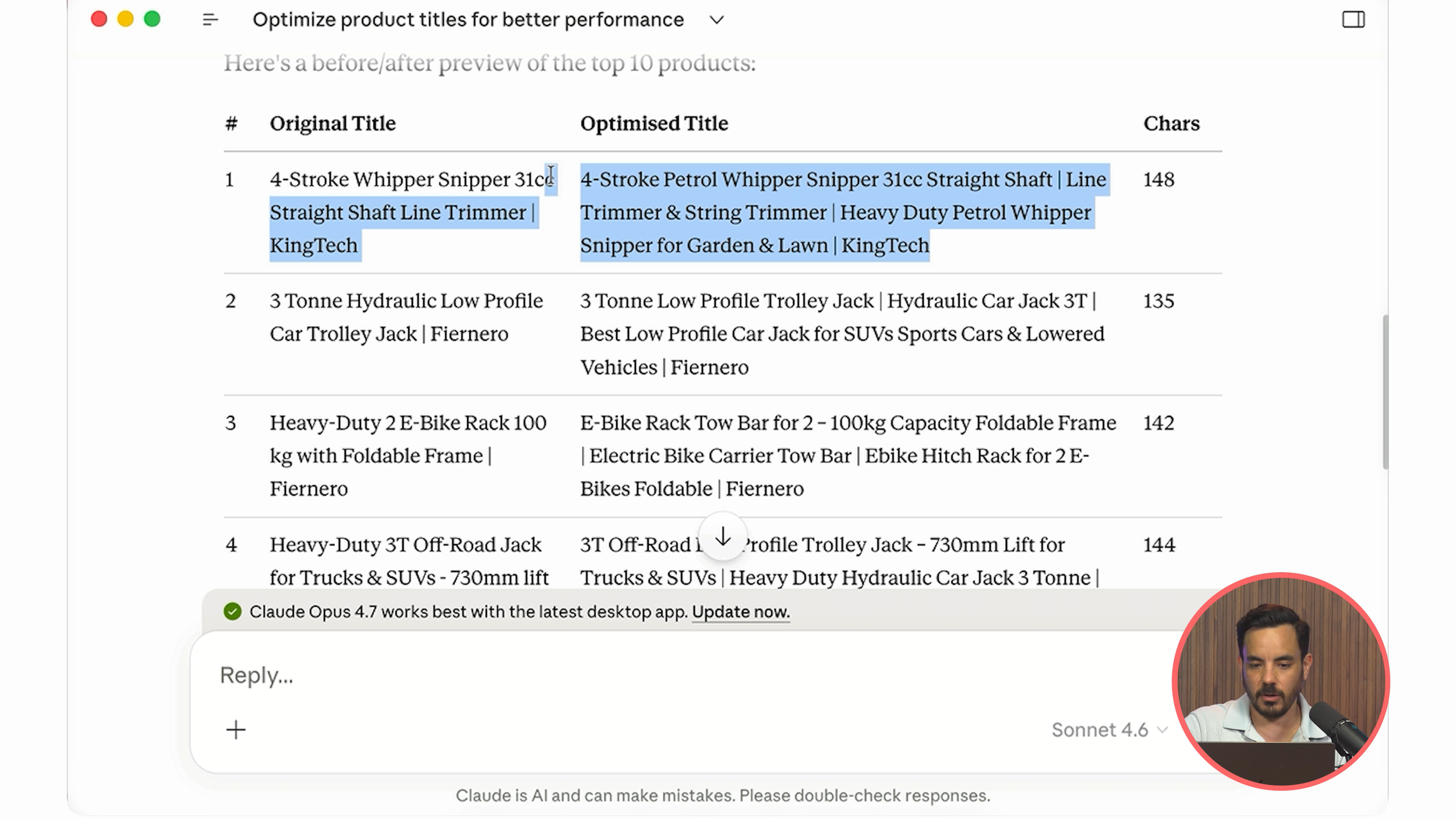
Product Title Reference is the important one. Open it in Excel and you will see your original titles alongside the optimised versions. The difference is usually dramatic. In the video example, the original titles were really short with very few keywords. The new titles packed in loads more relevant keywords: things like "petrol whipper snipper, line trimmer, string trimmer, heavy duty petrol whipper snipper for garden and lawn" plus the brand name at the end.

Product Title Research is the supporting file. It contains all the research Claude performed: product summaries, target audience analysis, key benefits, positioning notes, and full keyword research. In one example, it researched around 250 keywords across multiple sources, including AI-generated keywords and keywords pulled directly from Google Ads Keyword Planner.

If you want to change anything, just edit column C (the optimised title) directly in the Excel file, save it, and Claude Cowork will see your edits since it accesses the same file.

Exporting and Uploading to Google Merchant Center

Once you are happy with the titles, go back to Claude Cowork and simply type "export". It will take the approved product title file and generate a supplemental product feed ready for Google Merchant Center.

This supplemental feed contains just two columns: ID and Title. When you upload a supplemental feed, it overrides only the specified fields (in this case, titles) from your primary feed. Everything else in your primary feed stays completely untouched.

Here is how to upload it:

  1. Head to Google Merchant Center

  2. Click Data Sources

  3. Click Supplemental Sources

  4. Select Add product data from a file

  5. Click Upload file from your computer and select the product feed file

  6. Use the dropdown to select your main primary data feed

  7. Click Create Data Source

You will see a confirmation screen showing how many products were updated and matched. If there are any errors, you can literally copy the error message, paste it into Claude Cowork and say "there was an error with a couple of products, here is the error message, please fix" and it will sort it out for you.

Once the supplemental data feed is uploaded, your new titles will be written into your Google Shopping ads within 24 hours.

Why This Matters

I have been running my Google Ads agency, Big Flare, for over 13 years now. I have worked with hundreds of ecommerce companies, and product title optimisation is something I do on every single client account because the impact is that significant. The Product Title Optimiser automates what used to be tens of thousands of dollars worth of manual work into a process that takes minutes and costs nothing.

Now, go sort out those product titles.

Conclusion

Product titles are the most critical factor in Google Shopping performance, and optimising them at scale has traditionally been a time-consuming, manual process. The free Product Title Optimiser plugin for Claude Cowork changes that entirely. By connecting to your Google Ads data via Go Marble, it pulls real search term data, conducts keyword research across multiple sources, and generates optimised titles automatically. The setup process involves downloading Claude Desktop, installing the plugin from GitHub, connecting Go Marble as your data bridge, and running a single prompt. Results are delivered as reviewable Excel files, and the final output is a supplemental feed ready for direct upload to Google Merchant Center. The whole process takes minutes rather than days, and every step from research to export is handled by the AI agent.

How to Build a Full-Funnel Google Ads Flywheel System Using Demand Gen, AI Max for Search, and Performance Max

If you are running Google Ads right now and feel like you have hit a ceiling, like you cannot scale past a certain point no matter what you try, this one is for you.

Most advertisers are stuck at the bottom of the funnel. They are running a Shopping campaign through Performance Max, maybe a branded search campaign, and that is about it. Those campaigns are profitable, but they are not growing. You have probably tried increasing spend and watched your ROAS plummet, or tried broad match and it just wasted your money. The problem is not your campaigns. The problem is you are only using a fraction of what Google can actually do for you in 2026.

Google Ads Strategy for High-AOV Ecommerce: Demand Gen, Feed-Only PMax, and Product Segmentation

Recently I had a consulting call with an Irish jewellery brand selling into the American market. Their average order value sits between $300 and $400, they stock around 2,000 SKUs ranging from silver pieces at roughly $150 up to items well over $1,000, and their gross margins are strong: 55-60% on premium pieces, up to 75% on lower-priced items.

On paper, it is a healthy business. But they had pulled back from Performance Max after a bad experience, were running only Standard Shopping and brand campaigns, and despite having strong Meta video creative, they were not using any of it on Google.

Here is everything I told them, and honestly, most of it applies to any high-AOV ecommerce store.

Google Ads PPC Recommendations for Ecommerce Store Owners Who Manage Their Own Campaigns

A little while ago I had a consulting call with an Ecommerce store owner who sells personalised gifts: think custom blankets, engraved glassware, home decor, that sort of thing. They run a large catalogue, manufacture some products in-house, bring in others from suppliers, and do well during Q4 with ROAS peaks of around 600%.

On paper, the business is healthy. But the CEO was spending 15-20 hours per week during Q4 managing Google Ads. They had tried outsourcing to agencies twice and both times it failed. So they were stuck doing it themselves, burning through time that should have been spent on higher-leverage activities like partnership deals and strategic planning.

Here is everything I told them, and honestly, most of this applies to any Ecommerce store owner running their own campaigns.

How to Check If Google Ads Is Re-Enabling Your Paused Keywords (And Stop It)

If you have paused keywords in your Google Ads account, there is a real chance they are running again right now without your knowledge. Google has been quietly re-enabling paused keywords through a system tool, and here is the scary part: this is happening even to advertisers who have already turned off auto-apply recommendations.

This is not a rumour. Advertisers have been flagging this on LinkedIn, Reddit, and in PPC communities, and it has been confirmed by Search Engine Land.

May 2026 PPC Roundup: Google AI Mode Ads, Meta Creative Modifications, AI Traffic Growth, DSA Sunset, and the Meta vs Google Revenue Shift

May 2026 PPC Roundup: Google AI Mode Ads, Meta Creative Modifications, AI Traffic Growth, DSA Sunset, and the Meta vs Google Revenue Shift

Welcome to the May 2026 roundup. Five stories this month that I think every ecommerce advertiser needs to know about, ranging from Google quietly slipping ads into AI Mode, to Meta's AI tools modifying your creative without permission. Let me run through them all.

Google AI Mode Now Has Ads

This one flew under the radar for most advertisers, but it is a big deal.

Google is testing two new ad formats inside AI Mode: Sponsored Stores and Direct Offers. Sponsored Stores appear inside AI Mode product detail panels, while Direct Offers let advertisers embed discounts directly into AI-generated responses.

Here is the critical part: these placements work through your existing Shopping and Performance Max campaigns. There is no new campaign type you need to create. If you are already running Shopping or PMax, you may already be appearing in these placements without realising it.

What determines whether you win placement? It is not bid levels. Google is prioritising clean product feeds and strong structured data quality. This means your feed hygiene, your product titles, your descriptions, your attributes, and your structured data markup are what matter most for visibility in AI Mode.

Separately, Google also announced AI Max is now expanding to Standard Shopping campaigns, extending your reach into conversational, open-ended queries that traditional Shopping campaigns would never have matched against.

What to do now

Audit your product feed. Make sure your titles are descriptive and keyword-rich, your product attributes are fully populated, and your structured data markup is clean. This is the single biggest lever you have for winning AI Mode placements.

Meta's AI Tools Are Modifying Your Ad Creative Without Permission

This story made me genuinely uncomfortable.

Multiple advertisers are reporting that Meta's AI tools are making unauthorised modifications to their ad creative. The most notable case involves Snag Tights, where AI-generated tweaks actually distorted their product images. Meta is also adding unexpected AI testing budgets to campaigns without explicit advertiser consent.

On top of this, Meta's Andromeda ad retrieval system overhaul is changing the underlying mechanics of how ads are matched to users. And separately, Meta's Manus AI agent is showing up inside Ads Manager with the capability to manage campaign decisions autonomously.

The broader pattern here is clear: Meta is pushing automation aggressively, and it is coming at the expense of advertiser oversight and control.

What to do now

Go into your Meta Ads Manager and review your active ads for any unexpected creative variations. Check whether any AI-generated budget allocations have appeared that you did not approve. If you spot anything odd, document it and report it through the proper channels. I would also recommend checking your ad previews regularly rather than assuming what you uploaded is what is running.

AI Traffic to Retailers Up 393%

Adobe data shows that AI-driven traffic to US retailers increased 393% year-on-year in Q1 2026. That number alone is striking, but the quality of this traffic is what makes it really interesting.

AI visitors spend 48% longer on site, browse 13% more pages, and generate 37% more revenue per visit compared to traffic from other sources. This is not junk traffic; it is high-intent, high-value traffic.

Shopify Agentic Storefronts activated by default for eligible US merchants on 24 March 2026, feeding product data directly into ChatGPT recommendations. Amazon Rufus is doing something similar on the Amazon side. And Google AI Mode, as I covered above, is now showing Shopping ads directly in conversational results.

Here is the catch: having strong organic rankings or even 4.8-star reviews does not guarantee visibility in AI recommendations. AI evaluates product data quality independently. Your products might be completely invisible to AI-driven shopping despite performing well in traditional search.

What to do now

Open your Google Analytics and look for AI referral traffic. Compare its conversion quality against your other traffic sources. Then review your product data across all platforms, because the signals that drive AI recommendations are different from the signals that drive traditional SEO or paid search performance.

DSA Is Going Away in September

Google has officially confirmed that Dynamic Search Ads will transition to AI Max for Search campaigns, with Google beginning auto-upgrades in September 2026.

Starting from 15 April, new tools have been made available to help advertisers transfer DSA settings and data into standard ad groups. The transition roadmap gives you several months to migrate on your own terms before Google forces the change.

Important distinction: AI Max for Search is not Performance Max. It keeps you in the Search channel while layering in AI-driven query expansion. Think of it as DSA's replacement that uses AI to match against a broader range of conversational and open-ended queries, but without the black-box, multi-channel nature of PMax.

What to do now

If you are running DSA campaigns, start your migration now. Use the new transfer tools Google has provided to move your DSA settings into standard ad groups. Do not wait until September when Google will auto-upgrade you, because forced migrations rarely go smoothly, and you lose control over how your campaigns are restructured.

Meta Projected to Surpass Google in Ad Revenue for the First Time

This is a historic shift in the advertising industry.

eMarketer projects that Meta will surpass Google in global advertising revenue for the first time ever in 2026. The numbers: Meta is forecast at $243.46 billion versus Google's $239.54 billion. Meta is growing at 24.1% year-on-year compared to Google's 11.9%.

Where is this growth coming from? Instagram Reels now accounts for 33% of all Instagram ad impressions. Meta's Reels ad product is running at a $50 billion annual rate, and Advantage+ sits at a $60 billion annual run rate. The Reels and AI-powered automation products are driving enormous revenue.

On the Google side, Alphabet's Q1 2026 earnings confirmed Search revenue up 19% and YouTube up 11%, but both came in below analyst targets.

What this means for your strategy

The revenue inversion validates something many advertisers have felt for the past year: Meta's advertising products are genuinely performing, and the platform is earning its growth through results rather than just market position. If you have been hesitant about increasing Meta spend or testing Reels placements, this macro data suggests the broader market has already made that move.

Conclusion

Five major developments this month that ecommerce advertisers need to act on:

  1. Google AI Mode Ads are live through existing Shopping and PMax campaigns. Feed quality determines placement, not bids. Audit your product feed now.

  2. Meta's AI creative modifications are happening without explicit advertiser consent. Check your Ads Manager for unexpected variations and budget allocations.

  3. AI traffic to retailers grew 393% year-on-year with significantly higher conversion quality. Check your analytics for AI referral traffic and review your product data quality across platforms.

  4. DSA is being sunset in September 2026 with auto-upgrades to AI Max for Search. Migrate on your own terms before Google forces the change.

  5. Meta is projected to surpass Google in global ad revenue for the first time ever. The shift validates Meta's investment in Reels and Advantage+ automation, and is worth considering in your budget allocation decisions.

Feed-Only Performance Max: The Complete Setup Guide and Strategy for Ecommerce (2026)

Feed-only Performance Max is one of the most underused campaign setups in Ecommerce Google Ads right now, and most store owners have no idea they're missing out on a better campaign type.

If you're currently running full asset Performance Max or Standard Shopping, you might be leaving profitable ROAS on the table, especially in the early stages of your campaigns. This specific setup forces Google to focus almost entirely on the channel that consistently performs best for Ecommerce: Shopping. And you don't sacrifice any of Performance Max's most powerful features to do it.

April 2026 PPC Roundup: The 5 Stories Every Ecommerce Advertiser Needs to Act On This Month

April has been a wild month across paid media and ecommerce, and I've been fielding panicked messages from clients asking what on earth is going on with their numbers. So rather than drip-feed the answers, I've pulled together the five stories every ecommerce advertiser needs on their radar this month.

Two narratives run through all of this. First, AI is becoming the front door for product discovery on every major platform. Second, platforms are quietly stripping signal and control away from advertisers. Let's start with the one that's probably already shown up in your dashboard.