
I get asked all the time:
If you are just starting with Google Ads for ecommerce, what is the fastest path to real sales without wasting budget. Below is exactly how I set new accounts up, what I ignore at the start, and the few numbers I actually care about. It is the same approach my team at Big Flare uses across hundreds of ecommerce stores, distilled and simplified so you can execute today.
Why Google Ads Wins For Ecommerce
People on Google are not casually scrolling. They are actively looking for products, comparing options, and often ready to buy. That intent is everything. With Google Ads you choose the searches where your products appear, which lets you show up at the exact moment someone is hunting for what you sell.
Shopping Ads magnify this advantage because they show the product photo, price, title, and your store name directly in the results. Two big effects follow. First, unqualified clicks get filtered out because price and image are visible before the click. Second, those who do click are far more likely to be buyers. It is your catalogue placed on Google, in front of millions of active shoppers.
Campaign Types Explained For Absolute Beginners
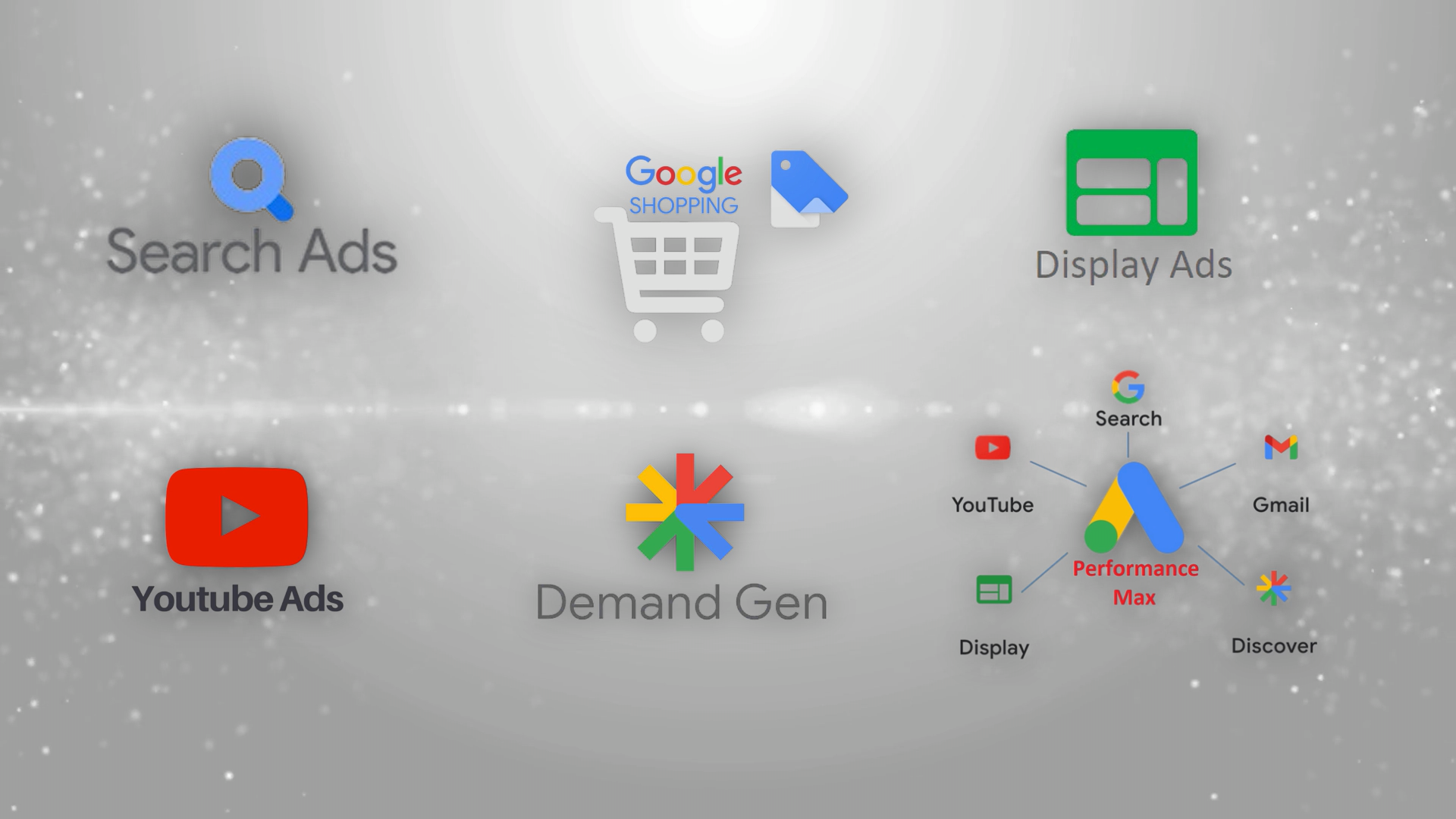
Google offers six core campaign types: Search, Shopping, Display, Video, Demand Gen, and Performance Max.
Here is how I advise beginners.
Search
Classic text ads triggered by keywords you choose. Great to capture bottom-funnel demand for branded and high intent non-brand terms. Still useful, but if you are starting from zero and need sales quickly, you will usually get more early wins with Shopping or Performance Max.
Display
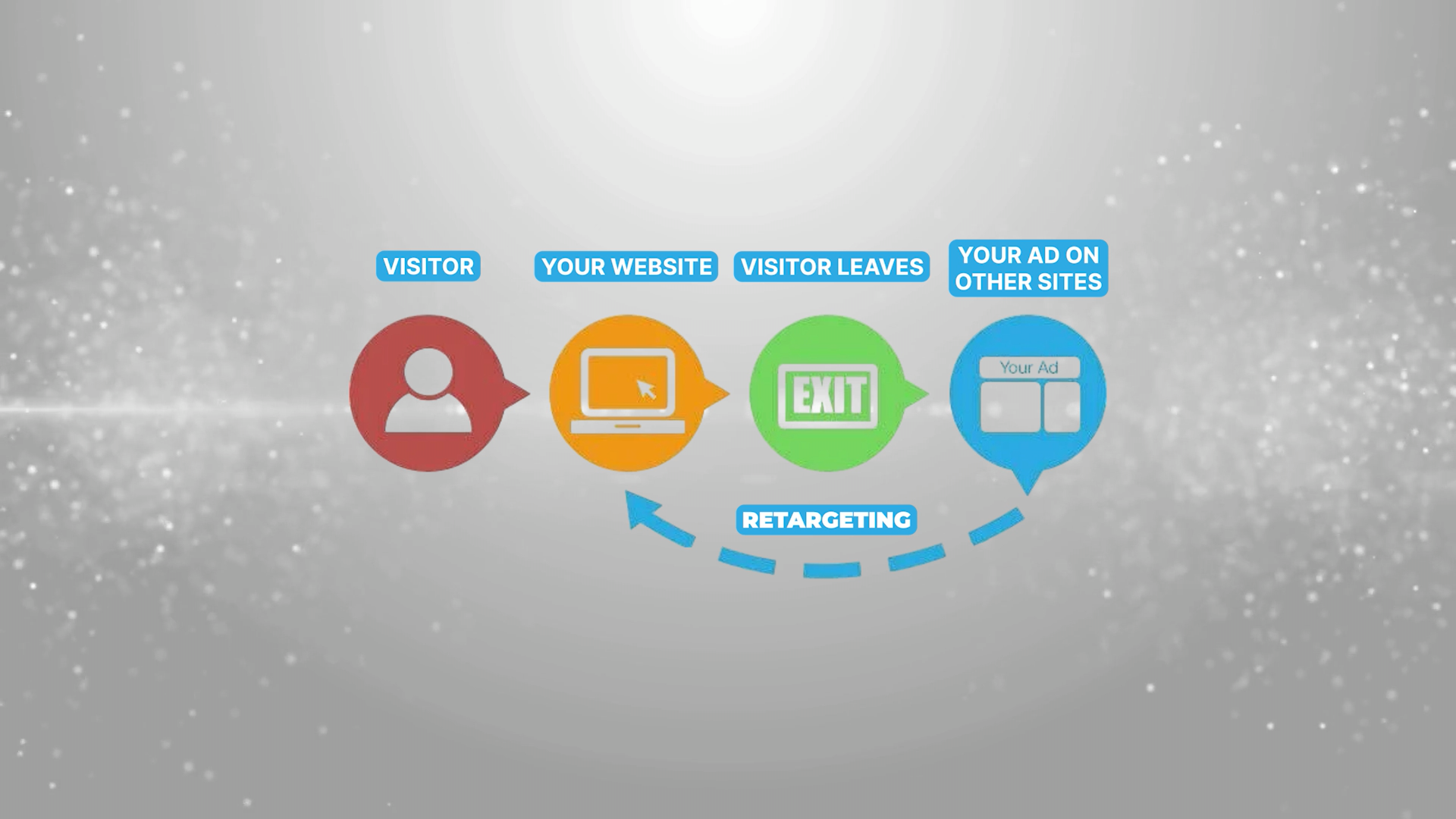
Image banners shown across the web. The best use for ecommerce is retargeting only. Cold Display for net-new audiences is tough to make profitable for most stores. If you are going to run Display, keep it to retargeting and skip cold audiences at the start.
Video
YouTube and video partner inventory. Powerful for storytelling and retargeting. For cold audiences it can work once you have creative volume and budget to test, but I do not recommend it as a beginner’s first step. Use Video mainly to re-engage non-buyers in the early phase.
Demand Gen
A newer, highly visual campaign that serves image and video creatives across YouTube, YouTube Shorts, Display, Discover, and Gmail. Excellent for building interest and reaching net-new audiences once you have foundations in place. Not where I start beginners who need immediate revenue, but worth adding later.
Standard Shopping
The ecommerce workhorse. Your products appear with image and price at the top of Google. When someone searches “metal wall art”, they see real product listings rather than only text ads. For most ecommerce advertisers, Shopping is where most Google Ads revenue originates.
Performance Max
My recommended starting point for most beginners. Think of it as “Shopping plus a bit of Search and retargeting”, with automation that learns where sales happen and pushes more there. In practice, PMax concentrates delivery into Shopping placements, adds some Search text ads, and sprinkles Display and Video retargeting. You set it up once and get coverage across the surfaces that tend to matter most for ecommerce.
Build The Foundation Before You Spend
There are a few must-haves that protect your budget and make optimisation possible.
Accurate conversion tracking with revenue
You need purchases tracked inside Google Ads with order value. If you log only a bare “purchase” but not the revenue, you cannot judge Return on Ad Spend. On Shopify, the free Google and YouTube app can simplify this. However you do it, ensure that every sale and its value are passed back so Spend, Revenue, ROAS, and Conversions all line up.
Google Merchant Center and a product feed
To run Shopping or PMax, you need a Google Merchant Center account. Think of it as Google’s copy of your catalogue. Your product feed is the data pipeline that keeps Merchant Center updated with product titles, prices, availability, and images. Most platforms like Shopify or WooCommerce have apps that generate and sync feeds automatically. Keep images clean and titles informative. If you change a price in your store, your feed should update Merchant Center, which then powers Shopping delivery.
Step-By-Step: Launch Your First Performance Max Campaign
Here is the exact beginner build that works.
In Google Ads, click New campaign, choose Sales as the objective.
Under conversion goals select Purchase only.
Choose Performance Max.
Link your Merchant Center so products can serve as Shopping Ads.
Name it clearly: “PMax – All Products” is fine for day one.
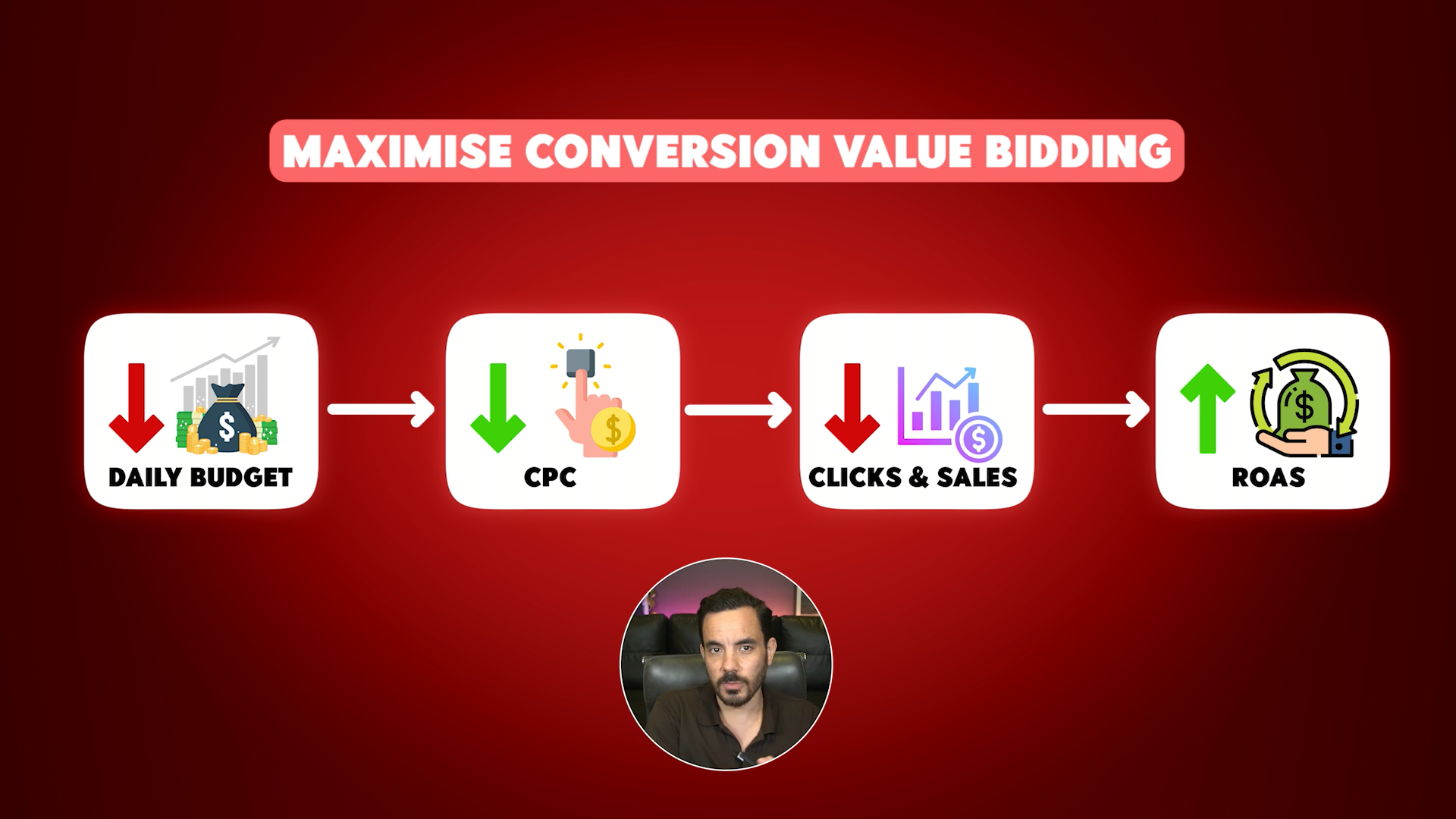
Bidding strategy: Maximise Conversion Value. Do not set a Target ROAS yet. Wait until you have roughly 50 purchases in 30 days.
Locations and language: match where you actually sell and support.
Skip AI asset generation for now.
Asset groups
Structure by product category if you have a range. One asset group per category makes your headlines, descriptions, and creatives more relevant. Add your final URL and craft varied headlines first. Headlines matter more than descriptions. Include your brand, core benefits, and clear calls to action.
Upload 15 to 20 quality images across square, landscape, and portrait. For videos, add your own rather than letting Google auto-generate. Auto-generated videos often underperform. Add ad assets next: sitelinks, callouts, structured snippets, price assets, and promotions. These make your ads larger and more clickable.
Audience signals and search themes
Add Search Themes that mirror how buyers look for your products. Include Audience Signals such as website visitors, customer lists, in-market categories, and custom segments that list relevant keywords and competitor sites. Signals are hints, not hard targets, but they speed up learning.
Budget
Pick a monthly testing budget you can live with for two to three months, divide by 30, and use that as your daily budget. Click Publish.
What To Expect: The Learning Phase
After launch, Google needs time to find the pockets of demand that buy. If you do around 200 sales per month, learning can settle within a couple of weeks. If you are at 20 sales per month, it can take several weeks. My rule of thumb is simple: do not judge anything until you have at least 50 conversions or one month of data, whichever comes first.
Daily swings are normal in this period. Zoom out to 30-day views or windows that include 50 plus conversions before making decisions.
The Only Four Numbers That Matter
There are many metrics in the interface. Most are noise at the start. I focus on these four.
Spend – how much you put in.
Revenue – also called Conversion Value in Google Ads.
ROAS – Revenue divided by Spend.
Conversions – number of tracked purchases.
Spend, Revenue, and ROAS tell you whether money is being made. Conversions tell you whether you have enough signal to trust the ROAS. A ROAS based on two orders is not meaningful. Get to 30 to 50 conversions and then take it seriously.
Budget Changes And Their Hidden Effect
While you run Maximise Conversion Value with no Target ROAS, budget changes do more than change spend. Increase the budget and Google raises effective CPC bids to reach more people. You usually get more clicks and more sales, but you pay more per click, which can lower ROAS. Decrease the budget and the reverse happens. CPCs tend to fall, volume drops, and ROAS often rises.
This is why I avoid wild budget swings early on. Adjust by no more than 10 to 20 percent per week while you collect data.
When And How To Switch To Target ROAS
Once you have about 50 conversions in the last 30 days, test switching to Target ROAS. This is where you tell Google the return you want, for example 500 percent ROAS, and it adjusts bids in real time to hit that. After the switch, budget changes do not whipsaw CPC the same way because the bidding keeps aiming at your ROAS target. You can scale faster here, sometimes 100 to 200 percent per week, but I still prefer thoughtful steps.
A practical scaling tip I like: set your daily budget about 30 to 50 percent above your recent average daily spend. That gives headroom to capture surges on busy days without bottlenecking delivery.
Five Costly Beginner Mistakes To Avoid
No conversion and revenue tracking
If revenue is not tracked, you cannot measure ROAS, so you cannot decide what to scale or cut. Fix this first.Wrong bidding strategy
Do not use Maximise Clicks. Cheap clicks are not a goal. Use Maximise Conversion Value, then move to Target ROAS once you have the data.No negative keywords
Check the Search Terms report. Add negatives for irrelevant intent, for example “repair”, “free”, or unrelated categories. This protects budget and improves product-market fit for your queries.Judging too quickly
Respect the learning phase. Use 30-day views or wait for 50 plus conversions before calling winners or losers.Tweaking tiny details instead of big levers
Headlines versus descriptions swaps will not save a broken foundation. Prioritise budget, bid strategy, campaign structure, and feed quality. Those are the levers that move revenue.
Where To Go Next
A single, well-built PMax campaign will usually add a solid chunk of profit for a new store. Once stable, you can branch out. Segment PMax by product margins or lifecycle, stand up dedicated Search for your top terms, improve feed titles for keyword richness, and expand retargeting with Display and Video. That is the path I like when accounts graduate from the basics.
Conclusion
Google Ads works for ecommerce because it reaches people who are ready to buy. Start with foundations: accurate purchase tracking with revenue, a clean Merchant Center setup, and a healthy product feed. Launch a Performance Max campaign using Maximise Conversion Value, structure asset groups by category, add strong images, your own videos, and full ad assets. Use Audience Signals and Search Themes to speed learning. Measure only what matters at first: Spend, Revenue, ROAS, and Conversions. While on Maximise Conversion Value, keep budget changes to 10 to 20 percent per week and resist the urge to micromanage daily swings. When you reach roughly 50 conversions in 30 days, test Target ROAS to stabilise returns and scale smarter. Avoid the big five mistakes: missing revenue tracking, wrong bidding strategy, skipping negatives, judging too fast, and tinkering with minutiae. Execute this sequence and you will turn Google Ads into a reliable sales system for your store.