
The 6 Most Costly Retargeting Mistakes In Google Ads And How To Fix Them

Why Retargeting Deserves Your Attention
Why Retargeting Deserves Your Attention

I’ve audited hundreds of ecommerce accounts and I keep seeing the same problems ruin what should be one of your most profitable campaigns in Google Ads.

Retargeting, done correctly, consistently drives some of the highest return on ad spend in an account.

Done badly, it quietly bleeds budget, misses easy revenue, and gives you the false impression that retargeting is not worth it. Below I am going straight into the six mistakes I see most often, and exactly how to fix each one.

Mistake 1: Not Running Dedicated Retargeting Campaigns

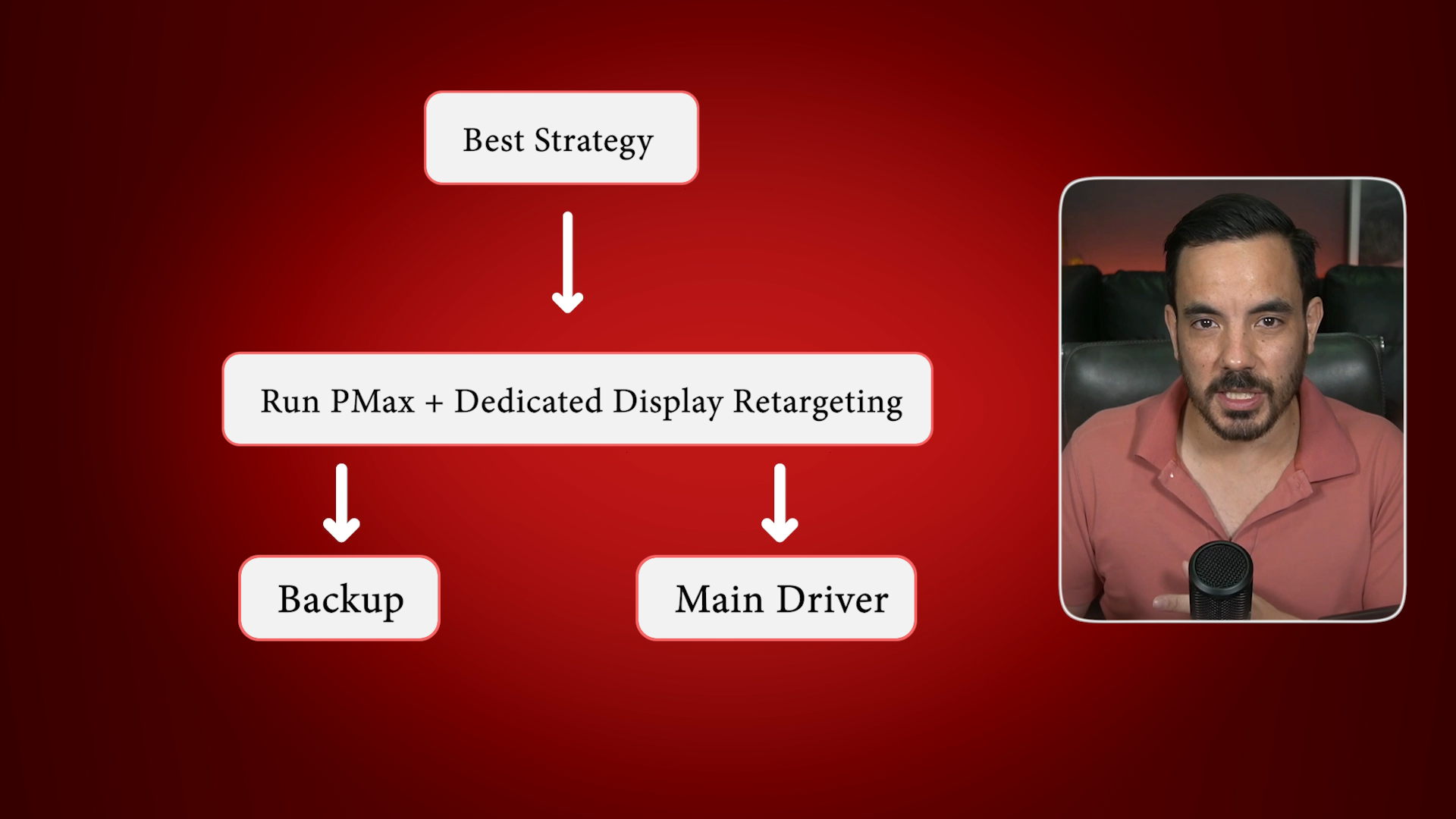
A lot of businesses assume Performance Max takes care of retargeting well enough. PMax does some retargeting, but it is a jack of all trades. It will never be as effective as a properly configured, dedicated Display retargeting campaign.

What works best in the real world is simple. Keep Performance Max running as a catch all, then layer a dedicated Display retargeting campaign on top as your main driver of remarketing performance. In side by side comparisons, I commonly see 100 to 200 percent higher ROAS from the dedicated retargeting campaign versus leaving PMax to handle everything.

How to set it up quickly

  1. From the main campaign screen, click the plus button and choose New campaign.

  2. Choose Sales as the objective. Confirm your conversion goal is Purchases. Remove Phone calls if it appears.

  3. Select Display as the campaign type. Enter your homepage URL. You will set precise destination URLs in the ad stage, or dynamic ads will route users to the right product page automatically.

  4. Name it clearly, for example Display Retargeting.

  5. Set locations and languages correctly.

  6. Under More settings, open Dynamic ads and attach your product feed. I will explain this fully in Mistake 2.

  7. Set an initial daily budget that matches your remarketing audience size. As a rough rule, start small and scale as spend and results stabilise.

  8. In Targeting, choose Audience segments, then Your data segments, then Website visitors. Select the precise audiences you build in Mistake 4.

  9. Turn Optimised targeting off. If you leave it on, Google will expand to cold traffic, which defeats the point of retargeting.

Mistake 2: Forgetting To Attach Your Product Feed
Mistake 2: Forgetting To Attach Your Product Feed

If you skip the Merchant Center feed, you are not running true dynamic retargeting. Dynamic ads show people the exact products they viewed or left in their basket. This is where the best results come from.

The quick pre check

  1. In Google Ads, go to Tools, then Data manager. Confirm your Google Merchant Center account is linked and your feed is live.

  2. If it is not linked, link it now. If the feed is not healthy, fix that first.

Enabling dynamic ads in your retargeting campaign

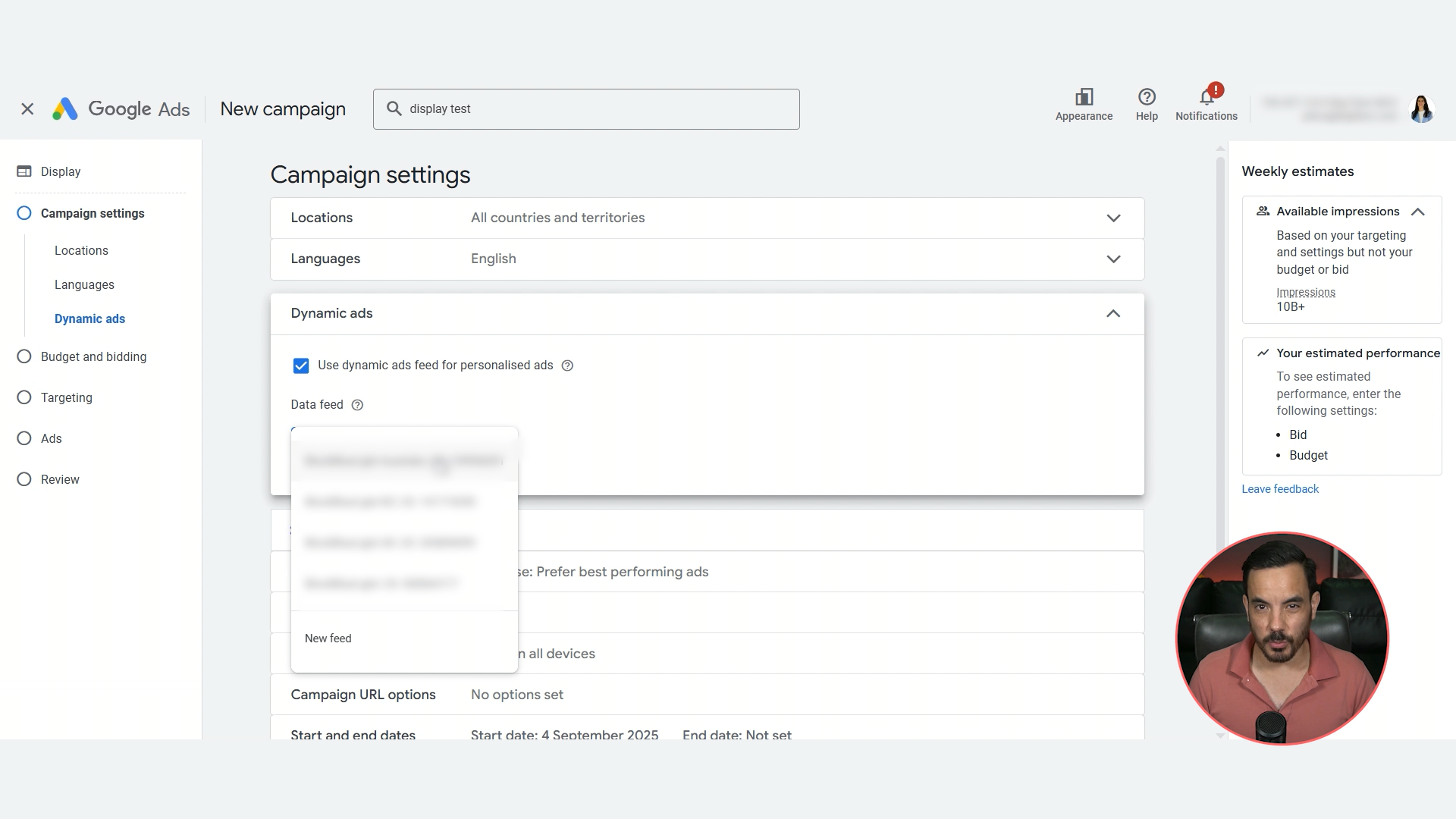
  1. In the Display retargeting campaign settings, find Dynamic ads.

  2. Tick Use dynamic ads feed for personalised ads.

  3. Select your product feed. If you have multiple feeds, select the one you want this campaign to use.

That is it. You now have product aware retargeting that can show each shopper exactly what they were considering.

Mistake 3: Choosing The Wrong Bidding Strategy

This is where many campaigns go off the rails. Click focused strategies like Manual CPC or Maximise Clicks feel safe, but in retargeting they usually give you more clicks and less revenue. Avoid them.

What to pick on day one

Set Bidding to Focus on conversion value. Do not tick the Target ROAS box at the start.

This approach lets the algorithm learn, find converting users, and build momentum without choking volume.

When to move to Target ROAS

Once the retargeting campaign has 50 or more conversions, ideally within 30 days, you can switch to Target ROAS. Until then, stay on Maximise conversion value without a target. I have tested this repeatedly and it consistently outperforms starting on Target ROAS from a cold start.

Mistake 4: Poor Audience Segmentation

Not all visitors are equal. Someone who bounced from the homepage is very different to someone who added to cart. If you throw them all into one giant All visitors audience, you lose control over bids, budgets, and message match.

The core segments to build

Create these Website visitors audiences in Audience manager:

  • Homepage viewers

  • Category page viewers

  • Product page viewers

  • Cart abandoners

  • Previous purchasers

  • Catch all All visitors

How to create audience segments

  1. Tools, Audience manager, plus button, Website visitors.

  2. Name it clearly, for example Product Viewers 30 days.

  3. Segment members: Visitors of webpages.

  4. Past 30 days.

  5. Rule: Page URL Contains /product.

  6. Exclusions: Page URL Contains /cart and Page URL Contains /thank_you to exclude cart visitors and buyers.

  7. Prefill with past 30 days if available.

  8. Create segment.

Note on URL rules: the above examples work for a default Shopify setup. If your site structure differs, update the rules accordingly.

Exclusions that keep buckets clean

  • Homepage audience: exclude Category, Product, Cart, Buyers.

  • Category audience: exclude Product, Cart, Buyers.

  • Product audience: exclude Cart, Buyers.

  • Cart abandoners: exclude Buyers.

  • Catch all: exclude every other audience.

Membership durations that map to intent
Membership durations that map to intent
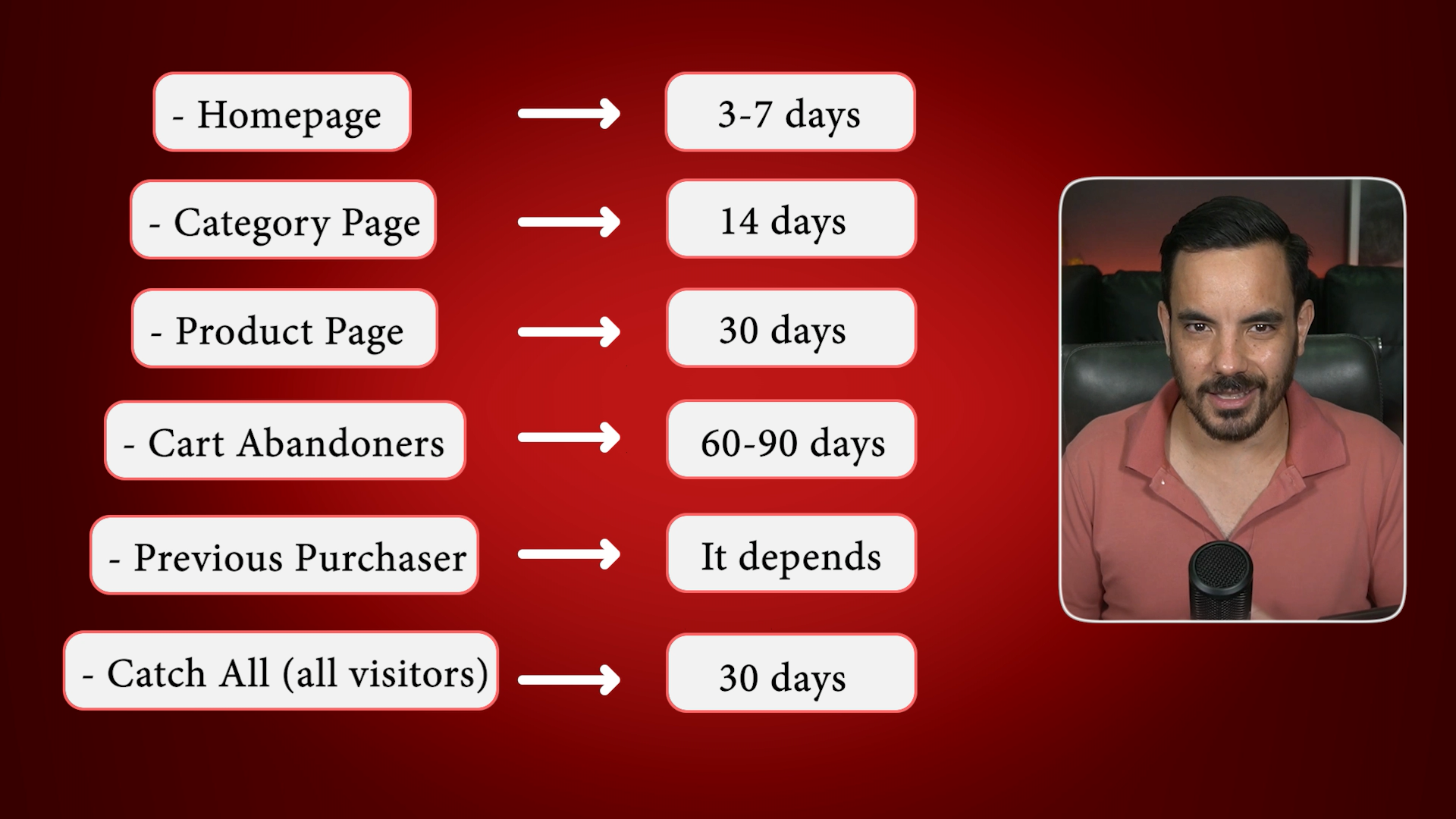
  • Homepage: 3 to 7 days.

  • Category: 14 days.

  • Product: 30 days.

  • Cart abandoners: 60 to 90 days.

  • Previous purchasers: depends on your buying cycle, for example 60 days for supplements, or do not retarget at all if you sell one time products.

  • Catch all: roughly 30 days.

This structure lets you bid more and for longer on hot segments, and trim spend on colder ones. Your ROAS and overall Google Ads performance will improve because budget follows intent.

Mistake 5: Generic Creatives

If every audience sees the same creative, performance drifts down. Message match matters.

Creative themes that align to intent

  • Cart abandoners and product viewers: dynamic product ads showing the exact items they viewed.

  • Category viewers: testimonials, reviews, comparisons, social proof.

  • Previous buyers: cross sells, upsells, loyalty offers, or replenishment reminders.

Now for an opinion I hold strongly after testing this across many accounts:

Do not hard map each creative type to a single audience with rigid ad group splits.

Give Google a full menu of creatives and let it choose the best dish for each user. It has more behavioural data than you do and it will generally serve the right format to the right person at the right time.

Mistake 6: Quitting Too Early

This one is about mindset. Retargeting audiences are smaller than prospecting, so conversion data comes in more slowly. If you judge performance off a week, you are mostly looking at noise. One or two conversions can swing ROAS wildly.

Give retargeting at least 30 days, ideally 60, before making judgement calls. Let the algorithm learn on Maximise conversion value. Iterate calmly on audience definitions and creatives. If the setup is correct, retargeting almost always becomes one of the highest efficiency parts of the account.

Bonus Tip: Exclude Recent Buyers During Sales Windows

When you run a big offer, exclude purchasers from the last 7 to 14 days from your sale retargeting. Nothing upsets a customer more than buying full price today and seeing 30 percent off tomorrow. Excluding recent buyers protects brand goodwill, reduces refund requests, and saves wasted spend.

A Quick Note If You Want Hands Off Growth

If you would rather have a specialist team set this up and scale it for you, my agency Big Flare has generated over 150 million dollars in tracked revenue from Google Ads for clients across the UK, USA, and Australia. We are a small senior team with fully customised service, meaning no copy-pasted campaign templates. Capacity is usually tight, but if you see a spot available, feel free to book a time to talk!

Conclusion

Retargeting should be one of your highest efficiency levers in Google Ads. The common failures are predictable and fixable. Run a dedicated Display retargeting campaign alongside Performance Max, and enable dynamic ads by attaching your Merchant Center feed. Start with Maximise conversion value without a Target ROAS, then switch to Target ROAS only after you hit roughly 50 conversions in 30 days. Segment audiences by intent, keep buckets clean with sensible exclusions, and set durations that match how hot the prospect is. Build creatives that match intent, but let Google choose which creative to serve per user. Finally, judge results over 30 to 60 days, and exclude very recent buyers during promotions to protect goodwill and avoid wasted spend. Follow these steps and you turn retargeting from a leaky bucket into a reliable profit engine.

The 4 Campaign Google Ads Structure That Boosted Our Clients’ ROAS

Today, I’m showing you a game-changing Google Ads campaign structure that we use across loads of ecommerce client accounts at my agency, Big Flare.

This structure has helped us generate over $150 million in ecommerce revenue, and it’s simple to implement once you understand how it works.

I call it the ROAS-based 4 Campaign Structure, and it works beautifully for both Performance Max and Standard Shopping campaigns.

Let’s jump right in.

Why You Should Run Google Shopping Ads on Your Own Brand Name

Let’s talk about something I see a lot of ecommerce brands get wrong…

Running Google Shopping ads on their own brand name.

Most people ask me something along the lines of:

“Should I run Google Shopping ads on my brand terms?”

And I always say: yes, absolutely.

Here’s why.

Why You Should Absolutely Run Shopping Ads on Brand Searches

Let me paint you a picture.

Someone searches for your brand on Google. If you’ve got Shopping ads running against your brand name, they’ll see a nice row of product tiles with pricing, photos and offers. Most importantly, they’ll likely click straight through to a product page.

Compare that to someone who clicks your Search ad (or organic result). They’ll usually land on the homepage and have to do a bunch more clicks to find a product they actually want to buy.

Which user is more likely to convert?

It’s almost always the one who lands directly on the product page.

Fewer clicks = higher conversion rate. It’s a simple truth in ecommerce.

So when someone types your brand into Google, don’t just rely on your homepage or organic listings to close the sale. Show up with Shopping ads and let Google’s AI recommend the products that the user is most likely to buy.

Bonus: Keep Competitors Off Your Brand

Another reason to run Shopping ads on your brand name?

It helps keep your competitors off your turf.

Even if competitors don’t explicitly mention your brand in their product feeds, Google can still associate their products with searches for your brand. It’s frustrating, but it happens.

If you’re not running Shopping ads on your own brand name, Google’s going to try to fill that space with something… and that something might be your competitors.

I’ve seen it happen time and again: brands who don’t run Shopping ads on their own name find the Shopping results on their brand searches filled with completely different stores selling similar products.

Don’t let that happen. Own your brand name. Own those Shopping placements.

Two Ways to Do It (and Which I Prefer)

So how do you actually make sure Shopping ads run on your brand name?

There are two main ways to do it, but one is clearly better than the other in my opinion.

Option 1: Let Performance Max Handle It (and Take Control with Search Campaigns)

This is my favourite approach.

Here’s what you do:

  • Don’t exclude your brand name from your Performance Max campaign.

  • Then, in a separate Search campaign dedicated to your brand terms, add every single possible spelling of your brand as exact match keywords.

Why does this work?

Because Google prioritises exact match keywords in Search campaigns over Performance Max for Search traffic. That means branded Search traffic (text ads) will go through your branded Search campaign, and Performance Max gets to keep showing Shopping ads on your brand name.

Result? You control your Search ads with your branded campaign, and you still get full Shopping ad coverage through PMax.

✅ Keeps your Shopping ads showing on brand
✅ Keeps your Search traffic well organised
✅ Google follows your preferences without messy workarounds

This is the setup I recommend for most brands.

Option 2: Split Out a Dedicated Brand Shopping Campaign

This is a backup option and one I personally find messy.

Here’s how it works:

  • You exclude your brand name from your main Performance Max campaign.

  • Then, you set up a separate Shopping campaign (usually a Standard Shopping campaign) that doesn’t have brand exclusions, so it can pick up brand term traffic.

Problem is: segmentation here isn’t perfect.

You’ll often find that some non-brand searches sneak their way into the brand campaign, and managing that can be a bit of a pain.

You’ve got to spend time checking search terms and filtering out anything non-branded, and even then it’s hard to get a 100% clean split.

That’s why I call this my less preferred option.

It works… sort of. But it requires more hands-on time, and it’s never as neat as it should be.

The Best Setup (In My Opinion)

Go with Option 1.

  • You’ll get full Shopping ad coverage on your brand name.

  • Your branded Search traffic will flow cleanly through a dedicated Search campaign.

  • You won’t need to spend hours trying to filter non-brand queries out of your Shopping campaigns.

Set it up once and you’re sorted. Google does what you want, and your Shopping ads show up right where they should: on your own brand name.

Final Thoughts

So, should you run Shopping ads on your brand name?

Yes. Absolutely. No question.

It helps conversions, it helps user experience, and it keeps competitors from poaching your customers.

The best way to do it is to:

  • Let Performance Max show Shopping ads on brand.

  • Use a dedicated branded Search campaign to control your Search ads with exact match keywords.

That way you don’t have to fight Google. You’re working with the system, and getting more control and better results as a result.

Conclusion

Running Shopping ads on your own brand name is one of the simplest and most effective strategies ecommerce brands can use to boost conversion rates and protect their search real estate.

When users search for your brand, Shopping ads offer a shortcut to the product page — increasing the likelihood of a purchase compared to generic homepage visits. Plus, Shopping ads help you defend against competitor ads that might otherwise appear for your brand terms.

The recommended setup is to let Performance Max show Shopping ads for your brand terms, while using a separate Search campaign with exact match brand keywords to capture and control branded Search traffic.

This approach gives you the best of both worlds — control and performance — without the messiness of splitting out Shopping campaigns or fighting with exclusions.

Performance Max vs Standard Shopping: Which One Should You Use (and Why)?

Today, let’s talk about one of the most common ecommerce Google Ads questions I get:

Should I use Standard Shopping or Performance Max?

If you’ve got a Google Merchant Center account and you’re trying to run product ads for an ecommerce store, this is a decision you’re going to have to make.

And while there’s no one-size-fits-all answer, I do have some strong opinions based on what we’re seeing inside the Big Flare client accounts.

Let’s get into it.

Why Chasing a High ROAS Might Be Hurting Your Ecommerce Business

Let’s talk about something that trips up a lot of ecommerce brands when it comes to Google Ads strategy: ROAS targets.

Because I see this all the time…

Clients setting sky-high ROAS targets that look good on paper, but are actually leaving a tonne of profit on the table.

So today, I want to clear up some myths, talk about what really matters when it comes to ROAS, and show you how to figure out the right ROAS target for your business.

How to Fix Google Merchant Center Disapprovals for International Ads with Price Mismatch

This week, we’re talking about a sneaky little problem that’s been silently killing Google Shopping ads for ecommerce stores running in multiple countries. If you’ve ever seen those infuriating “price mismatch” errors inside Google Merchant Center (GMC), especially on your Canadian or Australian feeds — even though your USD one looks perfect — this one’s for you.

How to Optimise Every Google Ads Asset Type for Maximum CTR

If you’re running Google Ads and haven’t fully set up and optimised your ad assets (what we used to call ad extensions), then you’re missing out on one of the easiest wins in the platform.

It’s genuinely low-hanging fruit. A proper ad asset setup gives you more real estate on the search results page, more compelling messaging, and best of all, free boosts to your click-through rate.

How to Scale Performance Max Campaigns on a Limited Budget

So, you’ve launched a Performance Max campaign, got a tight budget, and you’re wondering what to do next.

You’re not alone. One of the most common questions I get from ecommerce store owners is some version of: “What’s the smartest move when I’ve only got $1,000 to spend?”

Let’s talk about that, because getting this part right is where scrappy campaigns turn into profitable machines.

What Happens to Your ROAS After a Google Ads Suspension?

So here’s a story I hear all too often — and this one came straight from the YouTube comments:

“My ads were smashing it with a 300% ROAS in April. Then in May, Google suspended my account. After appealing, it was reopened about 15 days later… and ever since, I’ve been struggling to hit even a 50% ROAS. What happened?!”

If you’ve ever had your Google Ads account suspended (even temporarily) and your performance tanked afterwards, let’s unpack what might be going on, and what you can do about it.

A Sudden Drop in ROAS After Suspension

Let’s be clear on the situation: this advertiser was consistently hitting 200–300% ROAS, getting 400+ conversions per campaign in April. Then came the dreaded account suspension. After two weeks of downtime, they got back in… only to find ROAS had crashed to below 50%.

That’s a brutal swing.

And their first question was: “Did the suspension itself cause the drop?”

The short answer: Possibly. But not always in the way you think.

What Bid Strategy Are You Using?

The first thing I always ask in these situations is: “What bid strategy are you using now?” Because often, the real cause of poor performance isn’t the suspension itself, it’s the changes you made in response to the suspension.

In this case, the advertiser switched away from Target ROAS and Target CPA — the same bid strategies they were using when performance was good and instead went with something else.

This is a red flag.

If you were using a smart bidding strategy like Target ROAS, and it was working, then suddenly switching away from it will definitely impact performance.

Smart bidding strategies rely on data, conversion data especially, to optimise performance. When you stop feeding the machine, or change your targets, results often tank.

So the suspension may have been the trigger, but the drop in ROAS likely came from the changes you made in reaction to it.

Are You Letting Google’s Machine Learning Work?

The original campaigns were running well.

Post-suspension, the advertiser ditched smart bidding and started second-guessing things.

That’s completely understandable. It’s easy to panic when results fall off a cliff. But it’s also one of the worst times to change too many variables at once.

If you’re using Performance Max or Search campaigns and not giving Google enough conversions or a clear ROAS/CPA target, it gets confused. The machine learning models don’t know what “success” looks like anymore.

Pro tip: If you go back to using Target ROAS, give it at least 100 conversions before judging performance. Fewer than that, and the system just doesn’t have enough signal to optimise well.

Indirect Impacts: What Really Happens During a Suspension?

Let’s talk about direct vs. indirect impacts of an account suspension.

Direct impact

Sometimes, your account gets reopened but with lower Quality Scores, disrupted ad history, or lost learnings. This can affect your rankings and ad delivery.

But honestly? This is rare, especially if the suspension wasn’t for anything shady.

Indirect impact

This is the real killer.

The downtime often leads to panic changes: turning off campaigns, switching bid strategies, rebuilding things from scratch. That disrupts the system, kills your learning phase, and introduces a whole bunch of new variables.

When campaigns relaunch, Google has to relearn everything — audiences, bids, performance data. And that process can take weeks.

So while the suspension may not directly kill your ROAS, all the changes you made after might have done the damage.

Audience Targeting Might Be Too Narrow

In this case, the advertiser was running:

  • 2 Performance Max campaigns focused on audience/visitor targeting.

  • 2 Search campaigns also focused on audience targeting.

And they noticed something interesting: hardly any new customers coming in. It felt like Google was just hammering the same old customer list again and again.

That’s likely exactly what’s happening.

PMAX loves targeting users that already know your brand. It’ll optimise for the easy wins first: people who've visited your site, added to cart, or purchased before.

So if your audience signals are too narrow, PMAX and even Search might just keep retargeting your existing customer base over and over. That doesn’t help new customer acquisition and it can drag your ROAS down if existing customers aren’t buying again at the same rate.

If new customer acquisition is important to you (and let’s be honest, it usually is), then your targeting needs to reflect that.

What To Do If This Happens To You

If your Google Ads account was suspended, then reopened and now your ROAS is in the gutter, here’s what I recommend doing:

1. Go back to the bid strategy that worked.

If Target ROAS or Target CPA worked before, try them again. But let them run long enough — at least 100 conversions — before deciding they’re “not working”.

2. Audit your audience targeting.

Check if your PMAX or Search campaigns are leaning too heavily on existing customers. Add in new customer segments, or set up separate campaigns targeting broader intent or interest-based audiences.

3. Look at conversion volume and quality.

ROAS is revenue ÷ ad spend. So if conversions drop, or if the average order value tanks, your ROAS will follow.

Compare pre-suspension vs post-suspension:

  • Are you still getting 400+ conversions per campaign?

  • Are you attracting the same high-value customers?

4. Don’t panic-rebuild.

Avoid starting everything from scratch unless it’s absolutely necessary. Give your existing campaigns time to re-optimise and gather data again. The machine learning system can recover but only if you give it the right signals.

Conclusion

Getting your Google Ads account suspended can feel like a gut punch — especially when your ROAS collapses after it’s reinstated. But the real danger often comes from what you do next.

In most cases, it’s not the suspension that destroys performance. It’s the knee-jerk changes made in response — changing bid strategies, rebuilding campaigns, or narrowing targeting too much.

If this happens to you:

  • Don’t panic.

  • Return to the strategies that worked before (Target ROAS or Target CPA).

  • Give the system enough time and data to re-optimise.

  • Rebalance your targeting to bring in new customers — not just the same old ones.

With a calm approach and data-backed adjustments, your ROAS can bounce back stronger than ever.