
I see it all the time. A business is crushing it on Meta Ads, spending $50,000, $100,000, even multiple six figures per month at a profitable ROAS, but their Google Ads account is stuck at a fraction of that. Maybe 10 to 20% at most. And the frustrating part? Google often delivers higher ROAS than Meta.
So why can't you scale it?
There's a specific campaign type in Google Ads that most advertisers aren't using, and it's designed to compete directly with Meta.
That campaign type is Demand Gen.
If you do it right, it can potentially bring your Google spend up to Meta-level performance. Here's how to set it up, plus six pro strategies that make it work.

Setting Up Your Demand Gen Campaign
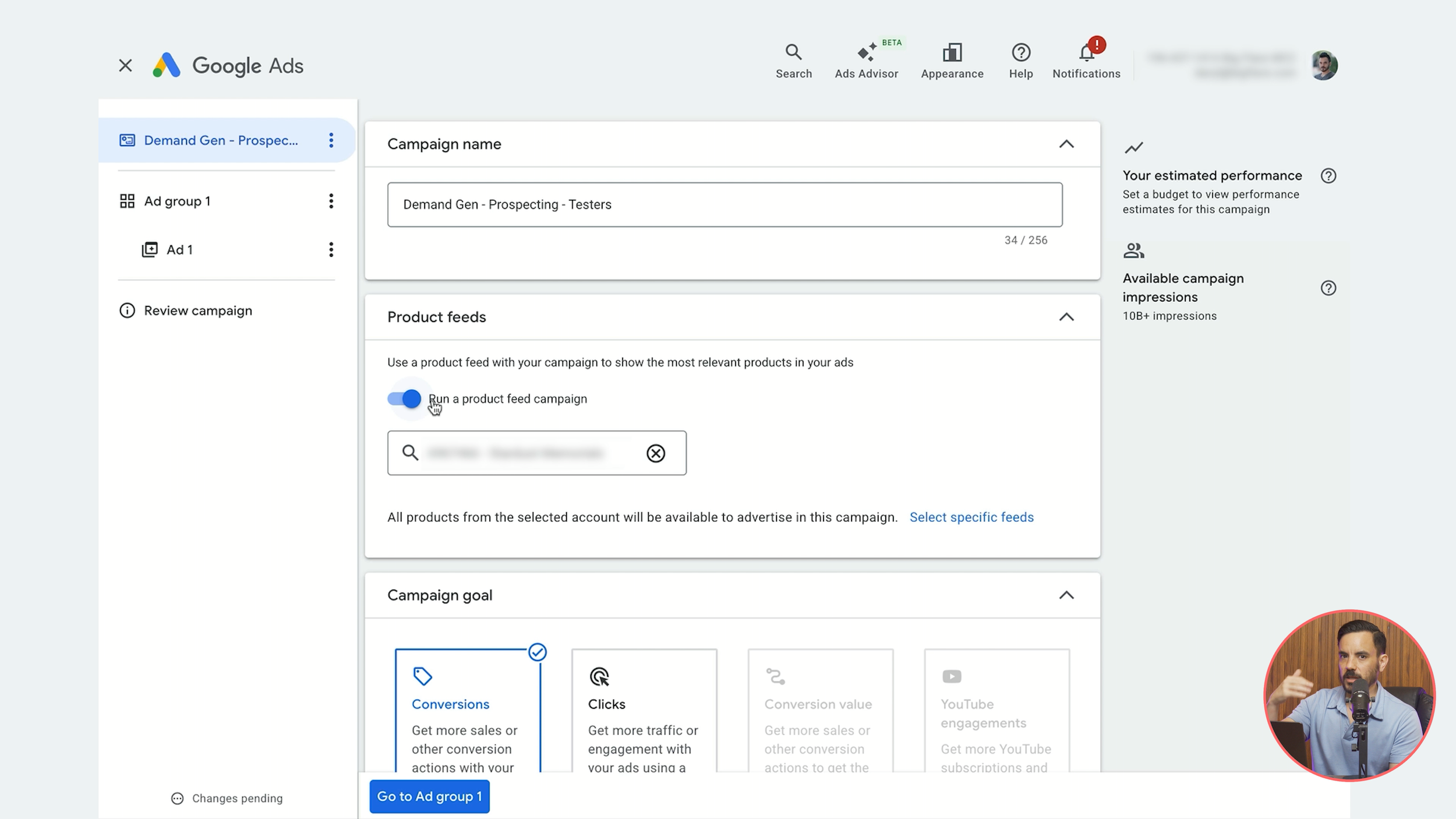
Create a new campaign using the Sales objective with only your purchase conversion goal selected, then choose Demand Gen. Key settings:
Product feed: Keep it attached. You can test removing it later, but start with it on.
Target CPA: Do not tick this. Leave the campaign optimising for conversions without a specific target; it frequently performs better that way.
Devices: Remove tablets and TV screens. They perform significantly lower for Demand Gen. Focus on computers and mobile phones.
Ad Group and Creative Setup
Untick Google Display Network for channels (even Google defaults to having it off). You'll be running video creative, so the system focuses on YouTube.
For ads, select video and product ads. Important: add only one video per ad. To test multiple videos, duplicate the ad and swap the video. This unlocks more granular reporting data.
Upload each video to YouTube as unlisted first, then plug in the URL. Fill out up to five headlines, five long headlines, and five descriptions. Leave call to action as automated. Make sure you have four or more site links attached.
Strategy 1: Repurpose Your Best Meta Videos
This is the most important tip I can give you. If you're already crushing it with video ads on Meta, you're sitting on a gold mine.
Go into Meta Ads Manager and identify your top 10 to 15 performing videos from prospecting campaigns. Look at ROAS, conversion rate, and engagement, then upload those same videos directly to Demand Gen.
No need to re-edit them. Google works with the same aspect ratios as Meta, and videos that perform on Meta can absolutely perform in Demand Gen. If those videos perform even reasonably well, that's a strong signal worth investing in further. Once validated, you can create YouTube-specific content. But start with what you already have.
Strategy 2: Lookalike Audiences Are Your Best Friend
Lookalike audiences are performing exceptionally well in Demand Gen right now. I recommend testing both of these types simultaneously.
All customers lookalike: Use your entire customer list or the built-in Google audience of purchasers, then create a lookalike. This gives Google a broad signal of what your typical customers look like.
High-value customers lookalike: Export only your highest lifetime value customers, your biggest spenders and most frequent repeat purchasers, and create a separate lookalike from those top customers alone.
In my experience, the high-value lookalike often performs even better. You're telling Google to find more people like your best customers, not just any customers. The algorithm has a higher quality signal to work with.
Don't stop at lookalikes though. Also test custom segments based on relevant keywords, in-market audiences, and affinity audiences.
Pro tip: check the Insights tab in Google Ads and scroll to Audience Insights. The audiences appearing frequently in your existing campaigns are often strong performers in Demand Gen too. For segment reach, I recommend "balanced" (broad is overkill, narrow is too restrictive).
Untick optimised targeting when starting out. Let the system learn with your specifically selected audiences first, then consider testing optimised targeting once you've scaled successfully.
Strategy 3: Keep Your Campaign Structure Simple
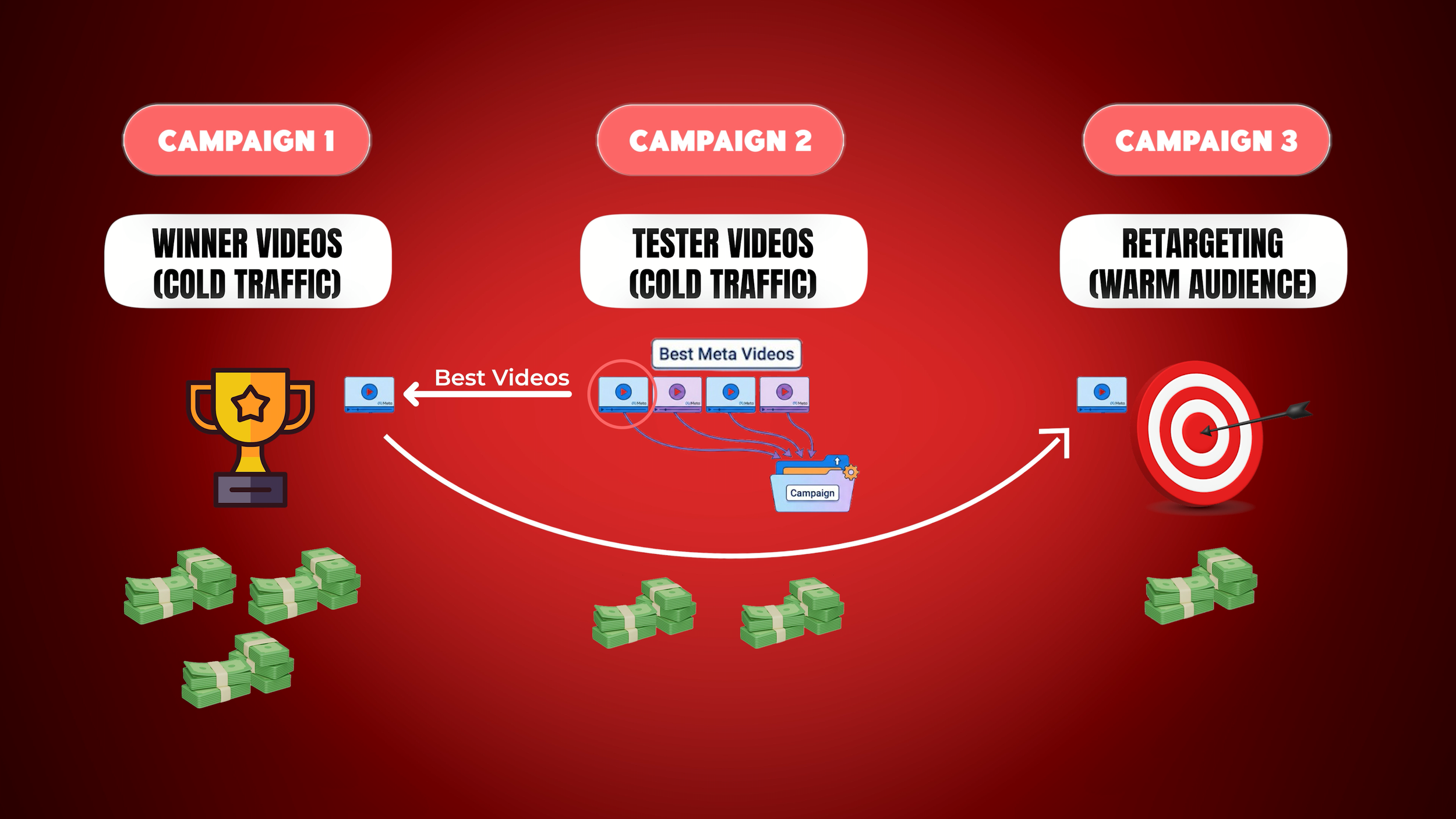
Don't overcomplicate things when you're starting out. Use a straightforward 2-3 campaign structure.
Campaign 1: Winners. Cold traffic prospecting with only your best-performing video creatives. Higher budget allocation because you're putting money behind proven converters.
Campaign 2: Testers. Also cold traffic prospecting, but for testing new creative. When starting out, all your initial Meta videos go here. Lower budget. As videos prove themselves, graduate them to Winners.
Campaign 3: Retargeting. Completely separate from prospecting. Target website visitors, product viewers, and add-to-cart abandoners. Keep the budget lower than prospecting. If this campaign is spending a decent amount, consider adding retargeting-specific videos that show off social proof or handle common objections.
Strategy 4: Bidding Strategy
Start with Maximise Conversions. Do not use a target CPA or ROAS.
This might surprise you. With Search and Shopping, I typically recommend graduating to Target ROAS once you have enough conversion data. But Demand Gen is a completely different beast. I've seen many mature Demand Gen campaigns continue to outperform when kept on plain Maximise Conversions with no target, even at scale. Top-of-funnel campaigns need more flexibility to find converting users in a broader audience pool.
Once you have a few hundred conversions, you can test Target CPA or Target ROAS, but structure it as an experiment, not a permanent switch. Run both bid strategies simultaneously using campaign experiments, compare over 2 to 4 weeks, and let the data guide your decision.
Strategy 5: Budget Recommendations
My rule of thumb:
Budget 10 to 20% of your current Meta Ads monthly spend.
Spending $50,000/month on Meta? Budget $5,000 to $10,000 for Demand Gen.
Spending $100,000? Budget $10,000 to $20,000.
I wouldn't go below $5,000 as a minimum.
This gives you enough to test effectively without overcommitting, with room for multiple audiences and creative.
Don't expect immediate results. Give Demand Gen 1-3 months. The algorithm needs time and data to learn, and your creative needs time to find its audience. Cutting the test too early is one of the biggest mistakes I see.
Strategy 6: The Hidden Metric You Must Track
This one is critical. You need to understand platform comparable conversions.
Your goal should be to match whatever ROAS and spend you're achieving on Meta. But here's where it becomes tricky: do not compare Demand Gen's standard ROAS column directly to your Meta Ads ROAS. They measure things differently, and if you make this comparison, Demand Gen will always look worse than it actually is.
Why Standard ROAS Undervalues Demand Gen
Google's standard ROAS column splits credit between all channels in a customer's journey and values clicks very highly while giving video views zero credit if there were any clicks on other campaigns.
Picture this: a customer sees your Demand Gen video on YouTube. They watch it, they're interested, but like most people they don't click on YouTube ads. Later, they search for your product, click a Shopping ad, browse but don't buy. The next day they search for your brand, click your branded search ad, and purchase.
What credit does Demand Gen receive? Zero.
All credit goes to Shopping and Search. But that video created the interest in the first place. Demand Gen generated the demand, Shopping and Search just captured it.
Platform Comparable ROAS: The Fairer Metric
Google Ads now has a metric called platform comparable conversions (and the related platform comparable ROAS). It attempts to match how Meta Ads attributes conversions by giving Demand Gen full credit, whether through a click or a view, even if other Google campaigns were clicked in the same journey. This mirrors exactly how Meta attributes conversions by default.
The catch: platform comparable ROAS will show higher numbers than your true ROAS because it gives full credit even when other channels also influenced the purchase. Standard ROAS undercounts Demand Gen; platform comparable ROAS overcounts it. The truth is usually somewhere in the middle.
How To Use This in Practice
Use platform comparable ROAS to compare with Meta Ads. Both platforms are then measuring the same way.
Concrete example: if your Meta Ads are doing 400% ROAS, aim for approximately 400% platform comparable ROAS in Demand Gen. Your standard ROAS column might show 200% or even lower. That's expected. The standard column often shows roughly half of what platform comparable shows.
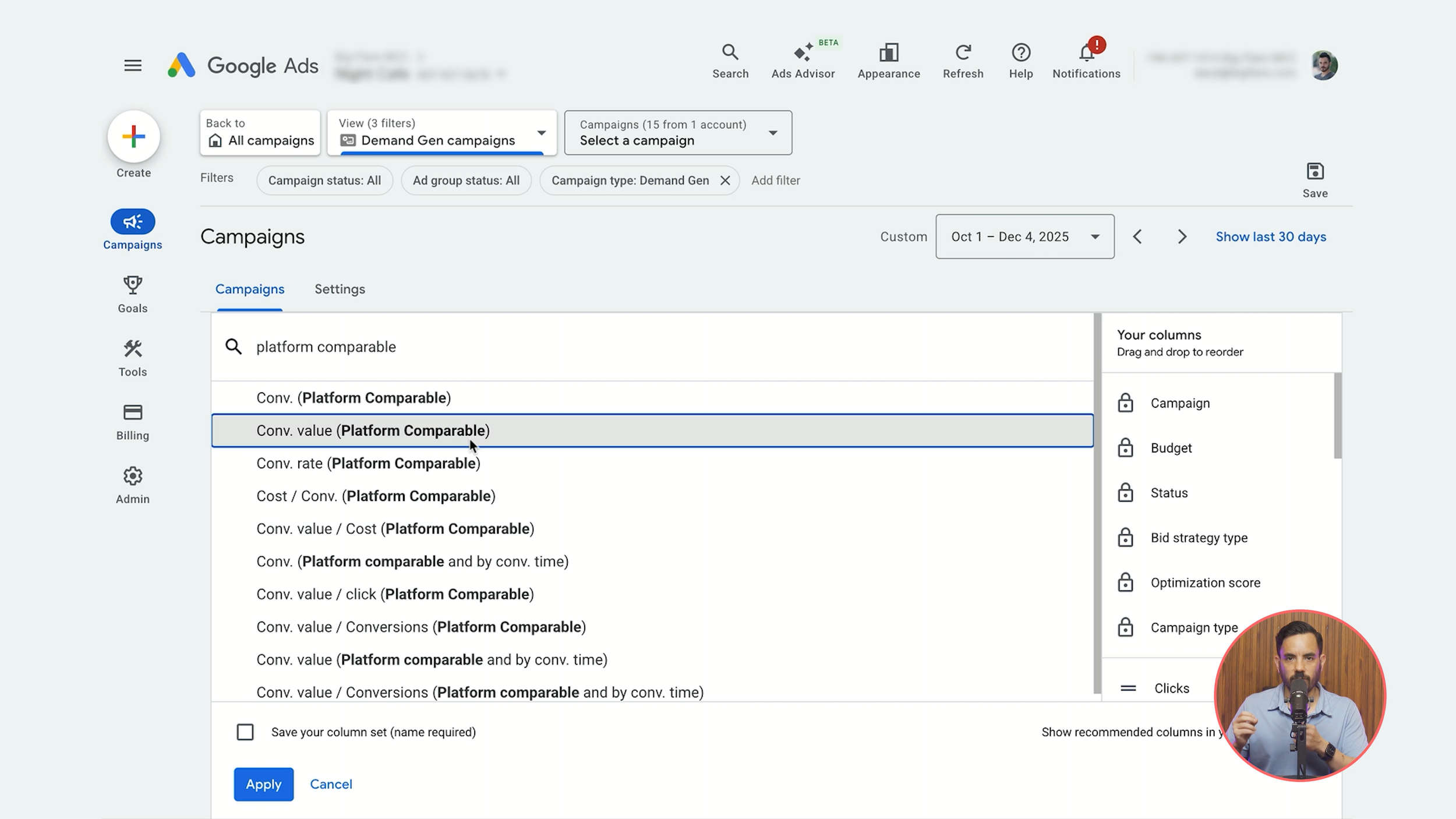
To find this column, modify your columns in Google Ads and search for "platform comparable." Add platform comparable conversions, conversion value, and ROAS to your reports.
Conclusion
Demand Gen is the campaign type that can bring your Google Ads spend up to Meta-level performance, but only if you approach it correctly. Start by repurposing your top 10 to 15 Meta videos directly, since there's no need to create YouTube-specific content initially. Lookalike audiences, particularly high-value customer lookalikes, are performing exceptionally well right now. Keep your campaign structure simple with a Winners, Testers, and Retargeting setup. Use Maximise Conversions bidding without a target CPA or ROAS, which is the opposite of Search and Shopping best practice but works better for top-of-funnel. Budget 10 to 20% of your Meta spend (minimum $5,000) and give the test 1 to 3 months. Most critically, track platform comparable ROAS rather than standard ROAS when comparing against Meta performance, since the standard column will always make Demand Gen look worse than it actually is. The truth sits somewhere between the two metrics, and platform comparable gives you the fairer apples-to-apples comparison with Meta.