
That impressive 800% ROAS you're seeing in Performance Max?
It might be hiding an uncomfortable truth:
Your branded traffic could be propping up the entire thing while your non-branded traffic runs unprofitably in the background.
I see this constantly. Business owners celebrating their PMax performance, completely unaware that their brand terms are doing all the heavy lifting. Let me show you exactly how to fix this.
The Before and After Setup
Before segmentation, you have Performance Max handling both branded and non-branded traffic in one blended campaign. That is a problem.
The structure we are building separates this into three parts:
Non-branded PMax - Your existing Performance Max, now only targeting non-brand terms
Shopping Brand - A Standard Shopping campaign capturing branded shopping traffic
Search Brand - A search campaign capturing branded search traffic
This separation gives you visibility into what is actually performing.
Why You Absolutely Need Shopping Brand
When you separate brand terms from PMax, you cannot simply set up a search brand campaign and call it a day. You will be missing out on shopping brand traffic.
Here is what happens if you skip this: Google continues showing shopping ads on your branded terms, but instead of your products, it fills that row with competitors.
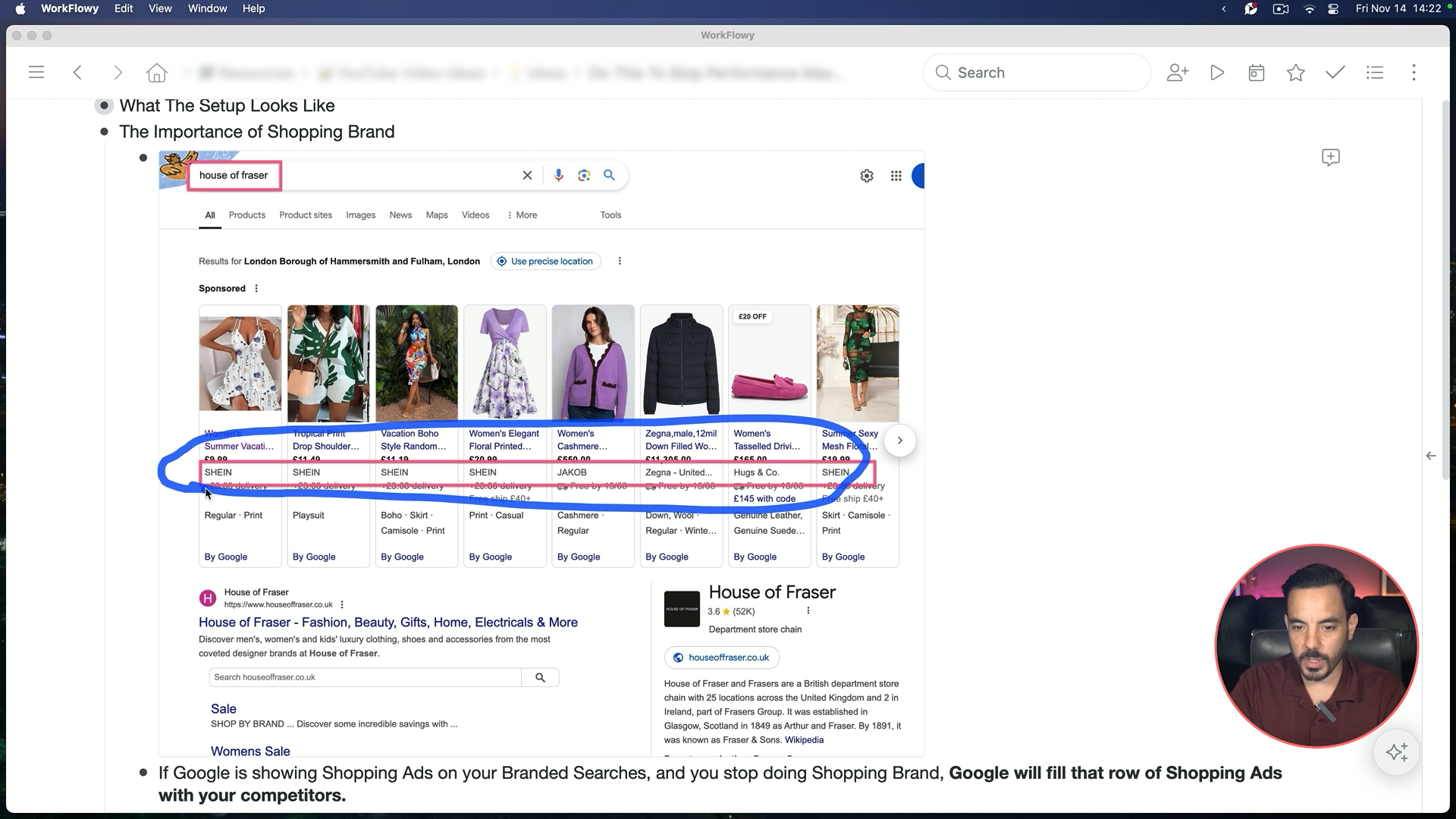
I found House of Fraser making this mistake. When you search for their brand, the shopping carousel is completely filled with competitors. Their organic listing sits below, but competitors occupy the prime real estate. Do not make this mistake.
How to Separate Brand from Performance Max
You need two steps, and doing just one is not enough.
Step 1: Brand Exclusions in Campaign Settings
Go into your PMax campaign settings, find brand exclusions, select your brand from the dropdown, and save.
But brand exclusions do not always work perfectly. I have seen cases where PMax still bid on brand term variations that Google did not capture automatically.
Step 2: Add Negative Keywords
Navigate to Audiences, Keywords, and Content, then Keywords. Click the plus button to add negative keywords.
My preferred approach: go to Tools, then Shared Library, then Exclusion Lists. Build a negative keyword list with all your branded terms. Apply it to all PMax campaigns at once.
Setting Up Branded Search
Focus on exact match and phrase match keywords.
Core brand terms - Add your main brand name and common misspellings as both phrase and exact match.
Long-tail variations - Brand plus product keywords or brand plus "reviews" should go in as exact match.
Monitor your search terms report regularly and add new long-tail terms as exact match for better control.
For budget, start with 5 to 10% of your PMax daily budget. Use Maximise Conversion Value without a target ROAS initially.
Setting Up Branded Shopping
Since you cannot target keywords in shopping, you flip the approach: tell Google what NOT to target.
Go into PMax, navigate to Insights, then Search Terms. Filter for "search term does not contain" and input your brand keywords. Download that list of non-branded terms. Add it as negative keywords to your shopping brand campaign.
Continuous Traffic Sculpting
The initial negative list is not enough. Your shopping brand will still trigger on some non-brand terms at first.
First week or two - Check search terms daily. Neg out non-brand terms in shopping brand. Also check PMax for brand variations that slipped through.
After about a month - Reduce to weekly checks. Your search term reports should be fairly clean by then.
For budget, go with 10 to 20% of your previous PMax daily budget. Start with Maximise Clicks (Standard Shopping does not have Maximise Conversion Value). Transition to Target ROAS when you have enough data.
When to Do This (And When Not To)
Skip This If...
You are a small brand with less than 100 conversions per month and Google Ads is 90 to 100% of your marketing. Just manage through PMax's average ROAS target. Increase that target to improve returns without added complexity.
Do This If...
You are a larger brand with thousands of conversions monthly
Google Ads is only 10 to 20% of your overall ad spend
You are spending significantly on Meta Ads, TikTok, or influencers
When your branded traffic is driven by multiple channels, you need specific control over brand versus non-brand within Google.
ROAS Expectations
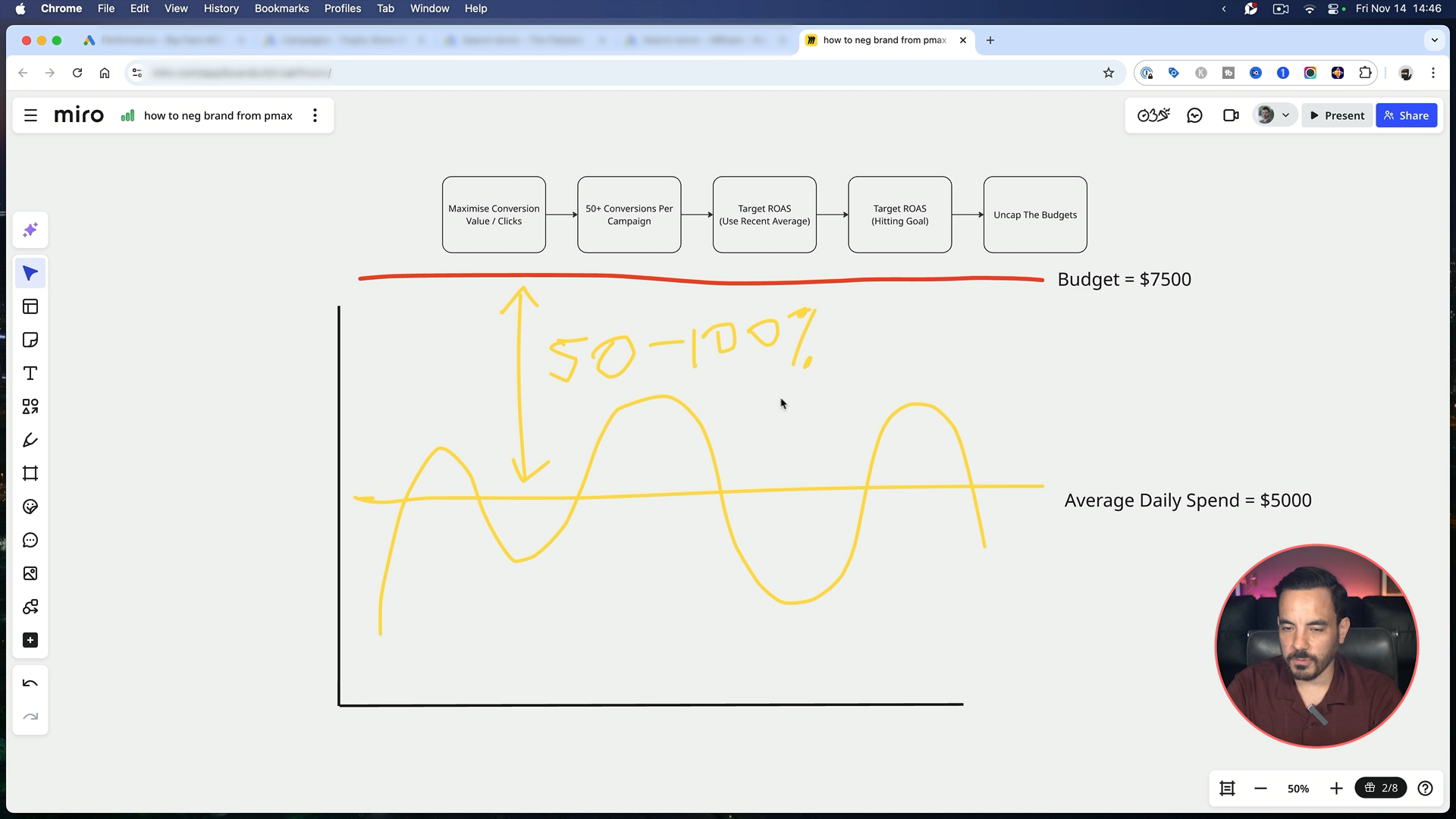
The goal is profitable Target ROAS with uncapped budgets. Start with Maximise Conversion Value or Maximise Clicks, collect 50 plus conversions monthly, then switch to Target ROAS using your recent average.
Keep 50 to 100% headroom between average daily spend and budget. If average spend is $100, set budget at $150 to $200.
Search Brand: Expect High ROAS
I look for a minimum 1,000% ROAS with 99 to 100% impression share. If your ROAS is 20x but impression share is only 80%, lower your ROAS target. A 15x ROAS with 99% impression share beats 30x with 80%.
Shopping Brand: Expect Lower ROAS
Shopping brand performs more like non-brand campaigns. If search brand does 1,500% and non-brand does 500%, shopping brand might do 600 to 700%.
Why? Shopping ad clickers are not loyal. They look at the image first, then price, then reviews. Your brand name has a very low impact on their click decision. Accept the lower ROAS and focus on capturing market share.
A New Feature Worth Watching
Google has quietly rolled out brand inclusions for Standard Shopping. This would let you target brand terms directly, eliminating the need for non-brand negative keywords. I have not seen it widely available yet, but look for it in your campaign settings.
That is the complete strategy. Get this right and you will finally see the true performance of your non-branded traffic.
Conclusion
PMax blends branded and non-branded traffic, masking poor non-brand performance
You need three campaigns: non-branded PMax, branded search, and branded shopping
Do not skip shopping brand; competitors will fill that space
Use both brand exclusions AND negative keywords in PMax
Search brand should target 1,000%+ ROAS with 99%+ impression share
Shopping brand performs more like non-brand; accept lower ROAS
Best for larger advertisers with multiple marketing channels