
I've spent the last 13 years running a Google Ads agency that has helped hundreds of ecommerce clients, and in that time I've found six things almost every advertiser does wrong. Fix them and you'll seriously increase your ROAS, sometimes by huge margins and sometimes within days. These aren't theory, they're the exact optimisations my team and I run for clients.
1. Understand When Performance Max Is Lying to You

Your PMax campaign looks profitable. You check the ROAS column, the number's healthy, and you move on. But that column is hiding something. Inside PMax there are multiple channels: shopping, search, display, Gmail, Google Discover and YouTube. Shopping and search almost always do the heavy lifting, while display, Gmail, YouTube and often Discover quietly drag the average down. Google only shows the blended figure, so you think you're profitable when really one or two channels carry the rest.
To spot it, click into your PMax campaign and open the Channel Performance report under Insights and Reports. Scroll past the worthless flowchart down to the table underneath, then modify the columns to add ROAS and CPA. One quirk to know is that Google lumps Shopping and Search together under Google Search, where "ads using product data" is shopping and "ads not using product data" is search text ads.
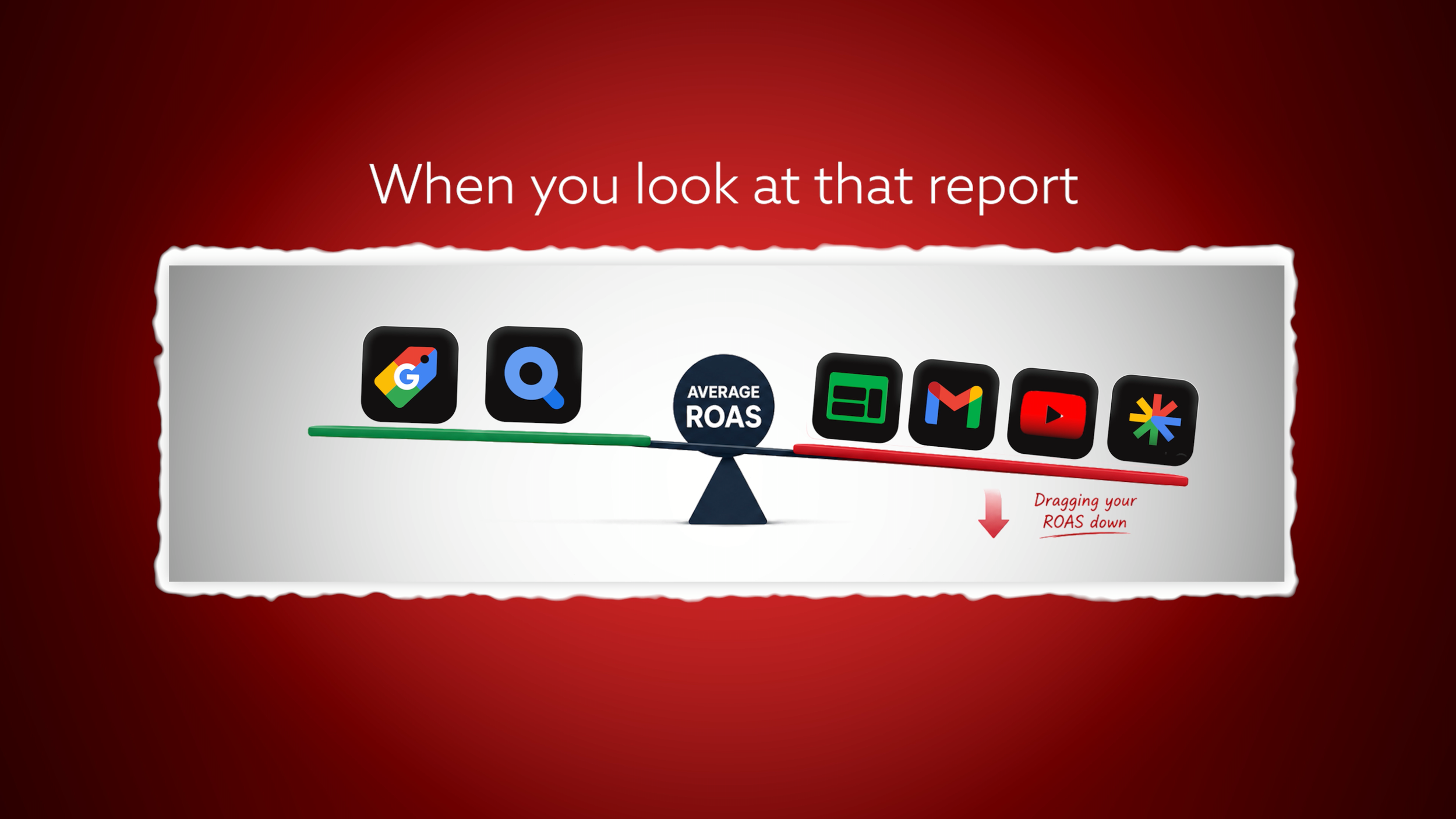
In one of our accounts, search and shopping ran a 13x and 27x ROAS, while Display sat at 1.37x and YouTube at 6.7x, dragging the average down. The fix is feed-only Performance Max, a campaign with no creative assets at all. No images, no videos, no headlines, no descriptions, just the product feed. With nothing to serve, Google can only run on shopping placements, not display, Gmail or YouTube, so your losing channels are cut out completely and your ROAS climbs.
Strip the existing campaign rather than building a new one, because it holds your historical conversion data, a goldmine for the algorithm. Google forces an all-or-nothing approach, so deleting the assets means losing your search headlines and descriptions too. Since search inside PMax usually performs really well, you keep that traffic by building your own dedicated search campaign, which leads into tactic two.
2. Do Search, and Do It Properly
Most ecommerce advertisers I audit are not running search properly. They run lots of PMax, maybe some Standard Shopping, but barely any dedicated search beyond a single brand campaign. Bidding on your branded keyword is useful, but if that's all you do, you're missing a huge chunk of the search pie. Search volume is lower than shopping, but it is added profit at the same or better ROAS.
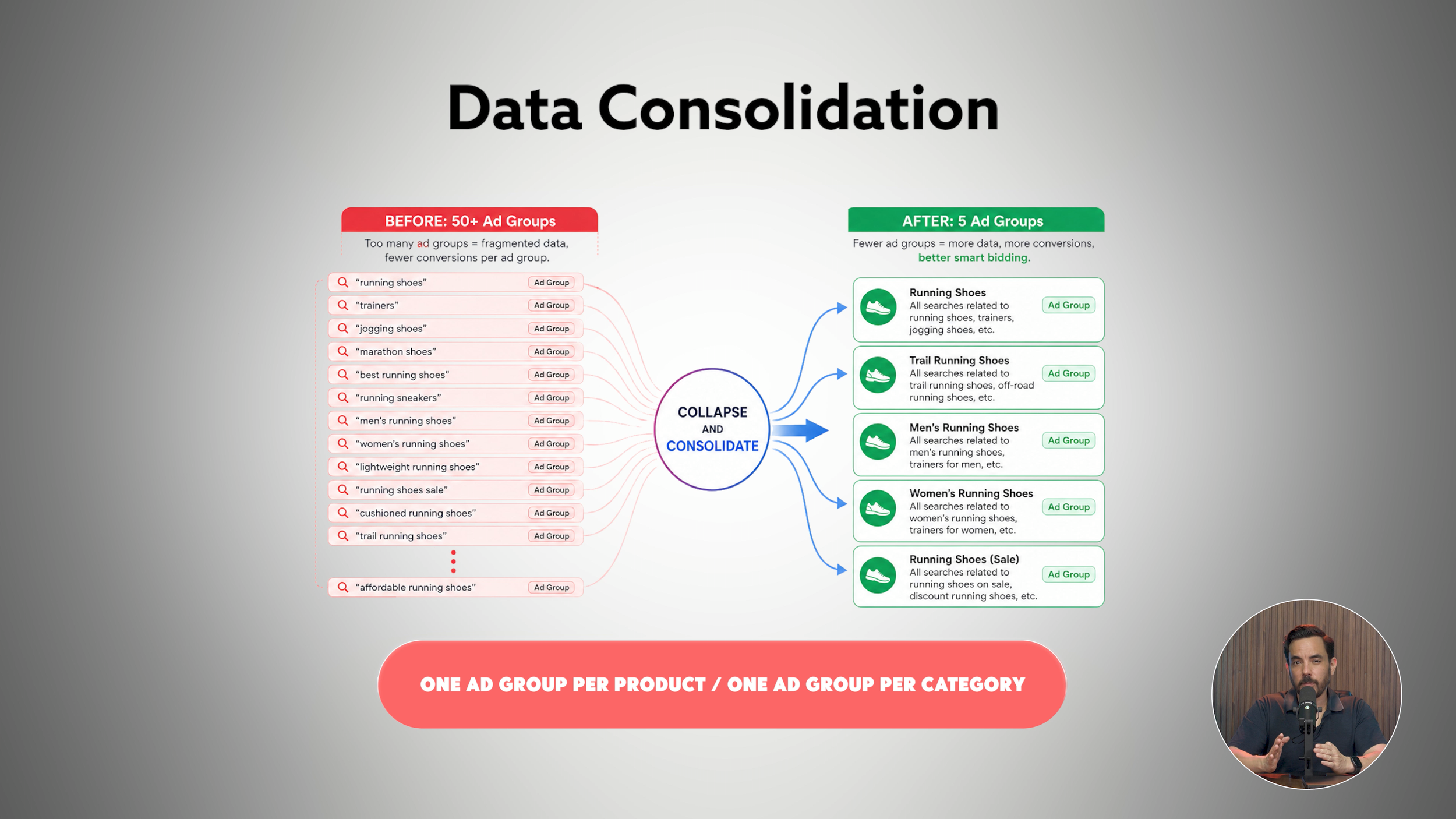
So what does doing search properly mean? First, run brand and non-brand segmented into distinct campaigns, with a much higher ROAS target on brand. Second, test ad copy effectively, which is where you outshine PMax. Ignore Google's ad strength indicator and run two ads per ad group of eight headlines and two descriptions each, rather than maxing out at 15 and four. Compare them regularly and swap the loser for a fresh challenger.
Third, aim for full keyword coverage using Google's free keyword planner. Fourth, structure it right. Single keyword ad groups (SKAGs) are dead. What works now is consolidation: as many conversions as possible per campaign and per ad group. If you sell running shoes, you no longer split "running shoes", "trainers" and "jogging shoes" into separate ad groups; you consolidate them into one, perhaps one per product or per category. Even on the largest accounts you can almost always stay under 50 ad groups, where previously you might have had thousands. Aim for more than 50 conversions per month per campaign, where smart bidding flies.
Two settings matter. Use broad match only with decent volume, a few hundred conversions per month at account level. Below that, stay on phrase match. Either way, add the converting long-tail terms as exact match into the same ad group for precision. And use smart bidding with target ROAS, not manual CPC or maximise clicks. A newer campaign can begin on maximise conversions, then switch to target ROAS once it passes 50.
3. Watch for a ROAS That's So Good It's Bad
A really high ROAS makes advertisers feel amazing. They see a 1200% return and assume they're making a fortune. But a target that high forces Google to throttle your CPC bids, leaving you with far lower traffic, a poor impression share, and an enormous amount of profit left on the table.
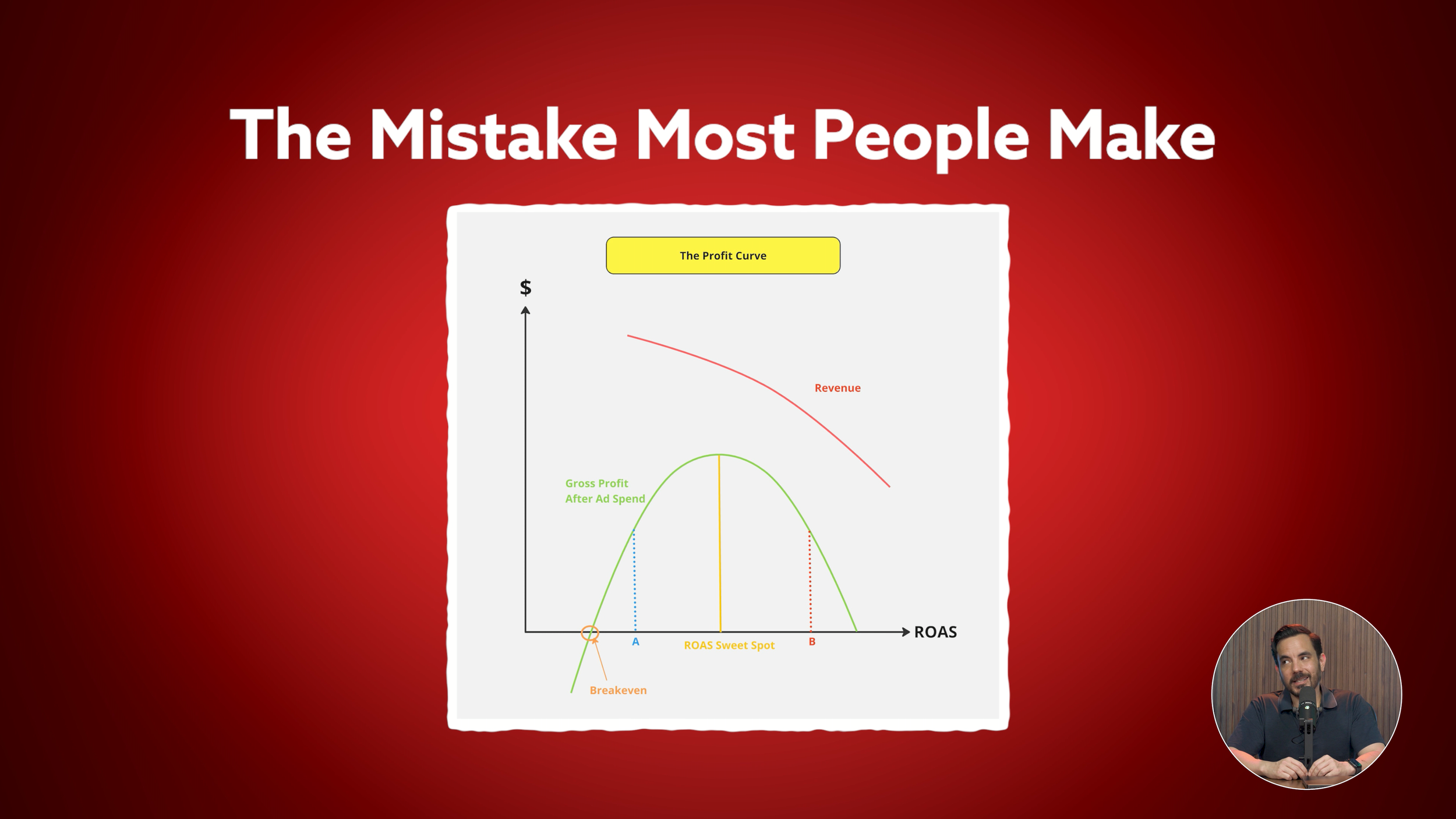
Picture the profit curve. Too high a ROAS target puts you at point B: spend throttled, revenue small, dollar profit tiny. Drop the target and you move towards the peak, where revenue and profit rise together. To find that peak, calculate your break-even ROAS, then add 200 to 300% on top. If your gross profit margin is 50%, your break-even ROAS is 200%, so your sweet spot is roughly 400 to 500%. A 1200% account-level ROAS sits way above this; I've even seen accounts at 2000% on a 150% break-even.
There's a second clue. Pull up your search impression share columns. If impression share sits under 25% and lost impression share due to rank is above 65%, your ROAS is strangling your volume, because Google isn't bidding you into the auction when your CPC bids sit too low. Only act if your ROAS sits comfortably above break-even with room to lower it while staying there. Never drop below it.
4. Run Your Account on Gross Profit After Ad Spend
Most advertisers focus on ROAS and revenue. They see ROAS above break-even, assume they're profitable, then chase revenue because that's the number Google shows them. The problem is Google Ads doesn't show gross profit after ad spend by default, so it sits ignored.
Here's the calculation. Take your revenue, multiply by your gross profit margin (after cost of goods and costs that vary with sales, but before OPEX and fixed costs), then subtract ad spend. What's left tells you whether your Google Ads are actually making you money. Optimise for revenue at its expense and you sit at point A on the curve, overspending with ROAS too low, watching revenue climb while profit quietly falls. Raise your targets, let revenue ease back, and make more profit.
So build it into your reporting. In Google Ads, create a custom column labelled "Gross profit after ad spend" with the formula of conversion value multiplied by your margin (say 0.4 for 40%), minus cost. Place it right after your ROAS column so you see revenue, CPA, ROAS and gross profit together. I call those the core four, and seeing them together is what lets you make smart decisions.
5. Close the Keyword Gaps
A keyword gap is a search term converting really well in your PMax or Standard Shopping search terms list that you're not targeting in a dedicated search campaign. Google is already showing your shopping ads against these queries and people are buying, but with no search ad you only capture the shopping placement, not the text ad real estate. The fix is simple: filter your shopping or PMax search terms for those that convert, compare them to your existing search keywords, and target every converting term that isn't yet a keyword.
6. Use the New Customer Acquisition Setting
This one's a biggie if you sell to customers with strong lifetime value. Plenty of advertisers deliberately prioritise new customer acquisition, knowing a new customer is worth far more long term than that first order, yet almost none use the new customer acquisition setting built for exactly that job.
You have two options. Turn the setting on inside your existing campaign, or duplicate the campaign and make the duplicate new-customers-only. A lot of people choose the duplicate, and that's the worst choice for performance, in my opinion. When you turn the setting on, Google assigns extra revenue to every new customer sale based on the LTV value you configure, prioritising them inside the bidding algorithm. The downside is your revenue column becomes inflated by that bonus, so the numbers no longer match your bank account, which is why people duplicate instead.
But duplicating causes conversion dilution, and modern Google Ads wants consolidated campaigns with as many conversions as possible. Splitting into two weaker campaigns hurts both, and you don't need to.
Keep it consolidated, turn the setting on, and add two columns: new customers and new customer lifetime value. To see true revenue, subtract the lifetime value column from your revenue column. No mismatch, just a smarter campaign bidding harder on the customers worth more to you. If you have strong LTV and aren't using this, you're leaving money on the table.
Now go increase that ROAS.
Conclusion
Six tactics will move your Google Ads ROAS, often quickly. First, use the Channel Performance report to find where PMax is bleeding money, and switch to feed-only PMax if display, Gmail and YouTube are dragging your average down. Second, run dedicated search properly: brand and non-brand segmented, two well-tested ads per ad group, full keyword coverage, consolidated ad groups, and target ROAS once you pass 50 conversions a month. Third, watch for a ROAS that's so high it throttles your traffic, and target 200 to 300% above break-even. Fourth, run your account on gross profit after ad spend, not revenue, using a custom column so the core four sit side by side. Fifth, close the keyword gaps between your shopping and search campaigns. Sixth, use the new customer acquisition setting inside a consolidated campaign if you sell to customers with strong lifetime value.