If there is one metric worth looking closely at in Google Ads, it is your click-through rate.
Improving your CTR pays you twice. You win more clicks and more traffic, and Google also rewards you with a cheaper CPC. More clicks, and cheaper clicks, at the same time. A double whammy. Which means every edge you can find for your ad copy is worth taking.
So today I am handing you a free Claude AI skill that finds those edges by analysing everything your customers are saying about you online. It mines hundreds of your customer reviews, works out what people love, what they complain about, and the exact language they use for both. Then it grades every headline you are currently running against that, and tells you what to write instead.
Because copy built from your customers' own words is what really wins the clicks. It says the thing buyers were already thinking.
What the Skill Actually Does
It is called the User Review Report Skill, it is completely free, and it was built to run in Claude Code, although it works perfectly well in Claude Cowork too.
Once installed, kicking things off is as simple as typing "run the user review report skill on bellroy.com". I used Bellroy as my example in the video, by the way. Not a client, just a brand I like.
One small thing before you press enter. Pick your model deliberately. I ran mine on Fable 5, which was almost certainly overkill, and Opus or Sonnet would have handled it comfortably.
The skill then asks a couple of questions so it can do a sharper job. First it confirms which market you are operating in.
The Google Ads Data Question
The second question is the important one, because it changes how useful the whole report is.
The skill can pull in your Google Ads data, meaning all your live ad copy, the CTR on each headline, what is working and what is not. It uses that alongside every review site it scrapes, so you can see precisely which headlines need improving.
You have three options here.
Option one is the easiest. If your Google Ads account is already connected to Claude Code or Claude Cowork, the skill sees the connection and pulls the data itself.
Option two is a manual export. You download a CSV of your ad copy data from Google Ads and attach it to the chat. I will walk through exactly how to pull that file in a moment.
Option three is to skip the Google Ads data entirely. The skill still runs and still does everything else it can do. You lose a couple of genuinely useful sections, but if you want a fast answer, or you have no account access right now, it is a perfectly valid choice.
That third option is also how you run this on a competitor, which the skill handles very happily. You will never have a competitor's ad data, so run it without and still walk away with their entire customer language landscape.
Once you answer, off it goes. It works across the main review sites, across Reddit, and across your own website, finding everywhere customers have written about you online. It compiles all of that into a research file, then presents it back as a report.
What Lands in the Report
The finished report arrives as an HTML artifact, which opens in your browser or inside the artifacts browser in the Claude Code desktop app.
It opens with a summary of how many reviews are out there and the overall picture. On the Bellroy run it had worked through over 200 Reddit posts and read 300 reviews before writing its high-level summary. In that case, customers buy thoughtful, considered design, and one recurring friction was leather phone cases peeling within weeks. Useful to know either way.
Below that sits a summary of the review landscape. Keep scrolling though, because the next section is where it earns its keep.
The Message Opportunity Map
This is the piece I would point you at first.
One axis is your current marketing, splitting things into what you already say and what is missing. The other is how often customers mention it. Your untapped gold sits in the top left corner: the things customers bring up constantly as a positive, that are completely absent from your marketing. If you do only one thing with this report, work those items into your ad copy, especially in your highest volume ad groups.
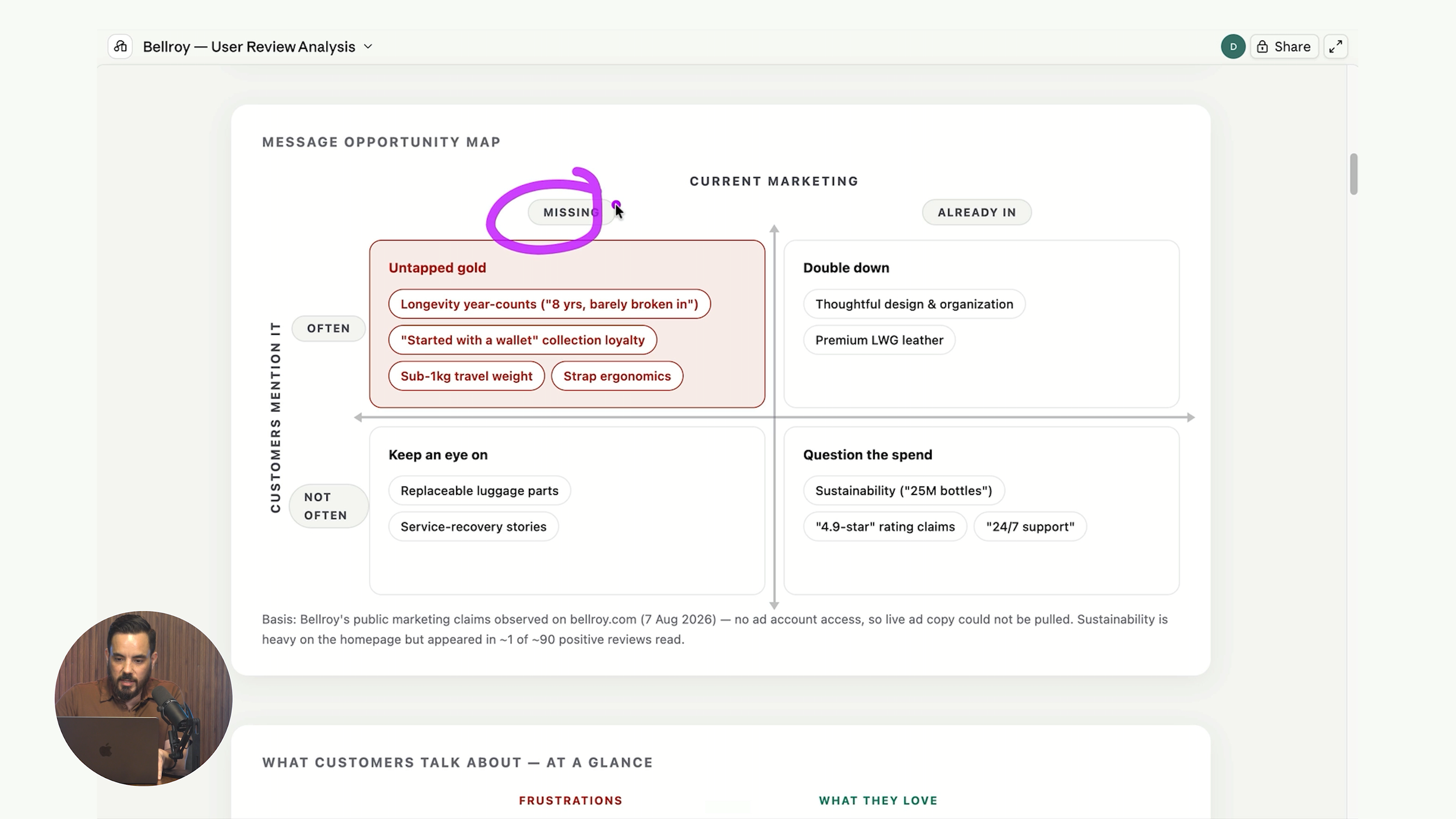
On the Bellroy example, longevity was sitting right there. Customers repeatedly say online that they have owned the product for years and years and it simply never breaks. Bellroy does not put that anywhere in their marketing. So if anyone from the Bellroy marketing team is reading, there is a free tip: put how durable your products are into your Google Ads headlines.
Another one that surfaced was collection loyalty. People buy a wallet first, then keep buying from the brand. Interesting for both copy and remarketing.
Worth understanding: run it without Google Ads data and "current marketing" means the language on your public website. Attach your Google Ads data and that column becomes your actual headlines instead, which is far more precise.
What Customers Love and What Frustrates Them
Next you receive a butterfly chart, a clean visual summary of what customers love most set against what they dislike most, so you can see the balance of praise and frustration at a glance.
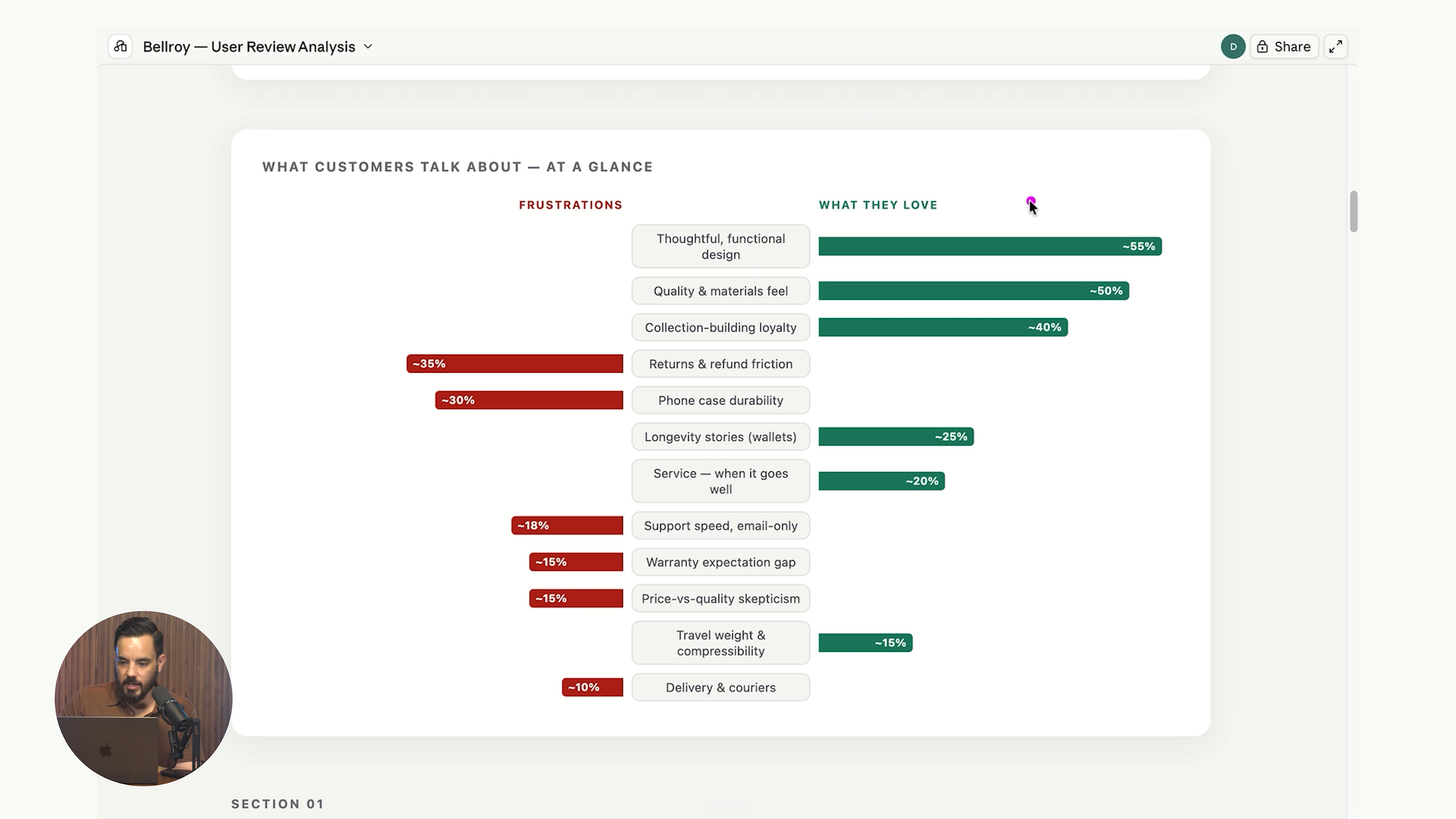
Then it breaks out the specifics. For Bellroy, thoughtful functional design came out on top, alongside direct quotes in the exact language customers use. You can lift those straight into your ads.
Underneath that is what frustrates your customers, meaning whatever is commonly flagged as a dislike. Read this one twice. Sometimes it is genuine advice on what to improve about the product or the service. Other times it is an objection you need to handle head on in your copy, whether that is in Google Ads, on your website, or anywhere else buyers meet you.
Then comes a voice of customer phrase bank, organised by topic, holding the exact phrases your customers use. Copy and paste these directly into your marketing. Finally, the report closes with specific copy recommendations for your ads and landing pages.
What Changes When You Attach Your Google Ads Data
This is my favourite part of the whole tool. With your ad copy data attached, you receive a direct comparison of your live headlines against what customers actually say.
On a real client run, one claim was "fast absorbing and non-greasy". We had 98 headlines using that across four variants. The report flagged it as the most disputed claim in the entire customer review set. That is a significant finding, and it is almost certainly something we now need to pull out of the headlines altogether.
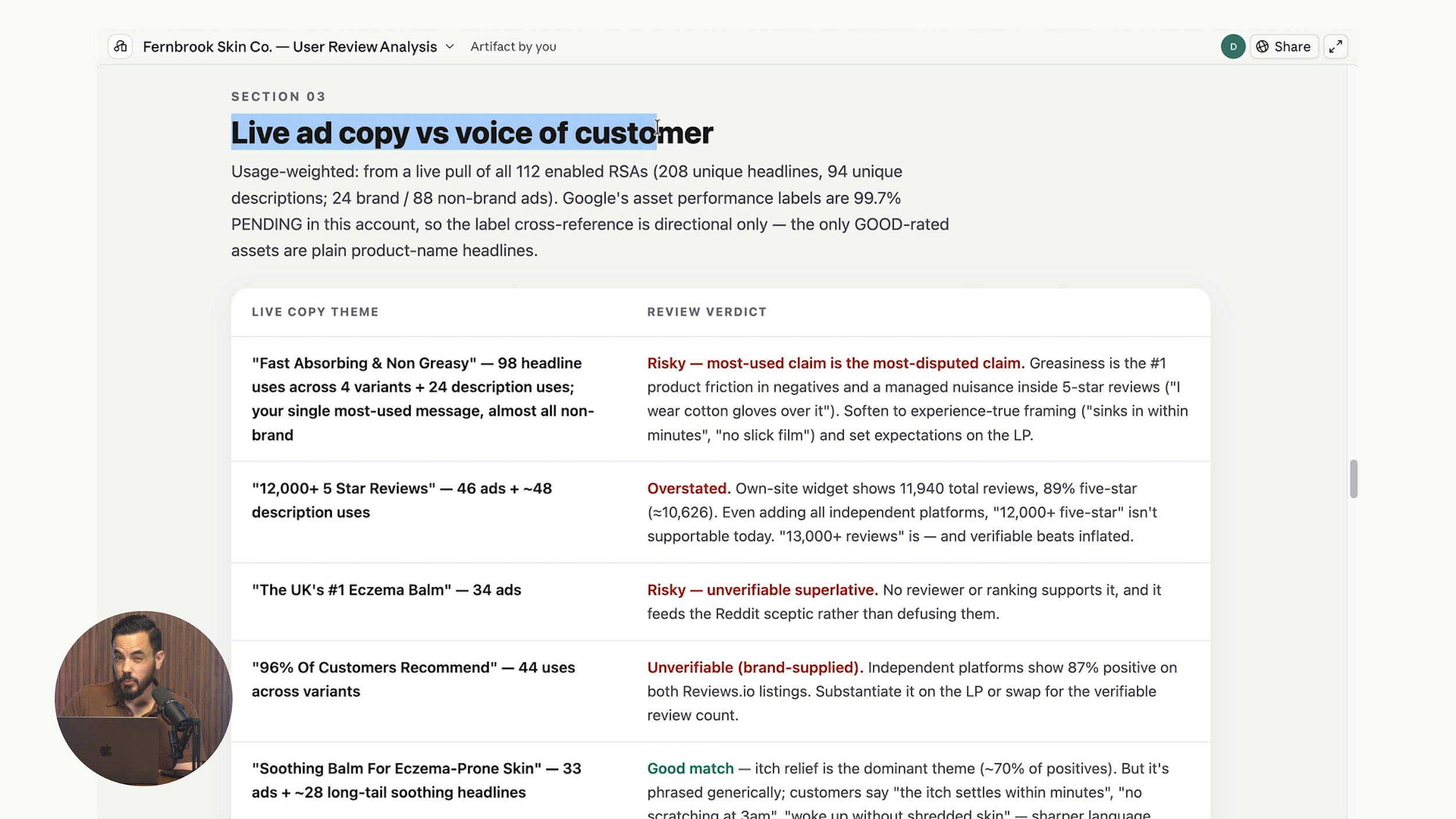
You also receive a full review of every claim you make, with the AI noting where a claim is unverifiable against real customer language. Another finding from that same account was "developed by dermatologists", which appeared in 37 ads. There was no echo of it in the reviews at all. Nobody was talking about it. Which suggests it may not matter much to buyers, and that headline slot would be better spent on a claim the reviews prove they do care about.
That is the kind of insight you will almost never reach by staring at a CTR column.
Pulling the CSV Out of Google Ads
If your account is not connected to Claude, here is the manual route.
Open your Google Ads account and set a nice long date range so you have plenty of data behind the numbers. The past 365 days works well. Head into Campaigns, then into Ads, and filter for Search campaigns so you are only looking at text ad copy.
Hit the download button, choose the CSV option, then attach that file to your chat with Claude and run the skill.
One note on the client report I showed in the video: I swapped the client name for a placeholder brand and tweaked some of the specific customer comments so nobody can identify them. Everything else is real data from a real account.
How to Claim the Skill
The User Review Report Skill is completely free. Click this link to receive your copy instantly.
Now go and start cranking up your Google Ads CTR using your customers' own language.
Conclusion
Here is a recap of the main points:
CTR pays you twice. A higher click-through rate wins you more clicks and traffic, and Google rewards you with a cheaper CPC on top, so every ad copy edge is worth chasing.
The User Review Report Skill is free. It runs in Claude Code or Claude Cowork, mining hundreds of reviews across review sites, Reddit and your own website to work out what customers love, what they complain about, and the exact words they use.
Attaching Google Ads data unlocks the best sections. Connect your account, attach a CSV export of your Search ad copy, or skip it entirely. Skipping still produces a strong report, and it is how you run the skill on competitors.
The Message Opportunity Map is the first place to look. The top left corner holds themes customers mention constantly that are missing from your marketing. Work those into your highest volume ad groups first.
The report grades your live claims. With ad data attached you see which headlines contradict customer reviews and which claims have no echo in the reviews at all, so you can cut dead weight and replace it with language buyers already use.
The phrase bank is copy and paste ready. Exact customer phrases organised by topic, plus specific copy recommendations for your ads and landing pages.