
I owe you a correction.
A couple of years ago I told everyone that the big juicy appeal button in Google Ads doesn't work, and that you should skip it and go straight to a human at Google.
That was true then. It isn't any more.
That button should now be one of the first things you reach for. But this is where advertisers burn their chances, because you do not just hammer it. There is a hard limit on how many times you can push it, and most people blow through it without realising it exists.
Here is the full, current process, in order.
Disapprovals Are Routine Maintenance Now
In Google's own recent Ads Safety Report, ads blocked or removed went UP to 8.3 billion, while accounts suspended went DOWN to 24.9 million.
Google has stopped swinging the ban hammer at whole advertisers and started surgically killing individual ads instead. Expect more of these, and treat them as routine account maintenance. Work the process, restore the ad, move on.
Step One: Find Out Exactly What You Were Flagged For
This is the step everyone skips.
Before you click a single thing, you need the exact policy name you were disapproved under. Not "something to do with healthcare". The precise policy, word for word.
Fastest way is to hover over the ad's status in your ads table. Google tells you right there.
With a few stacked up, the better place is Policy Manager. Left-hand sidebar, Tools, Troubleshooting, Policy Manager, then the Policy Issues tab. One list, every policy problem in the account.
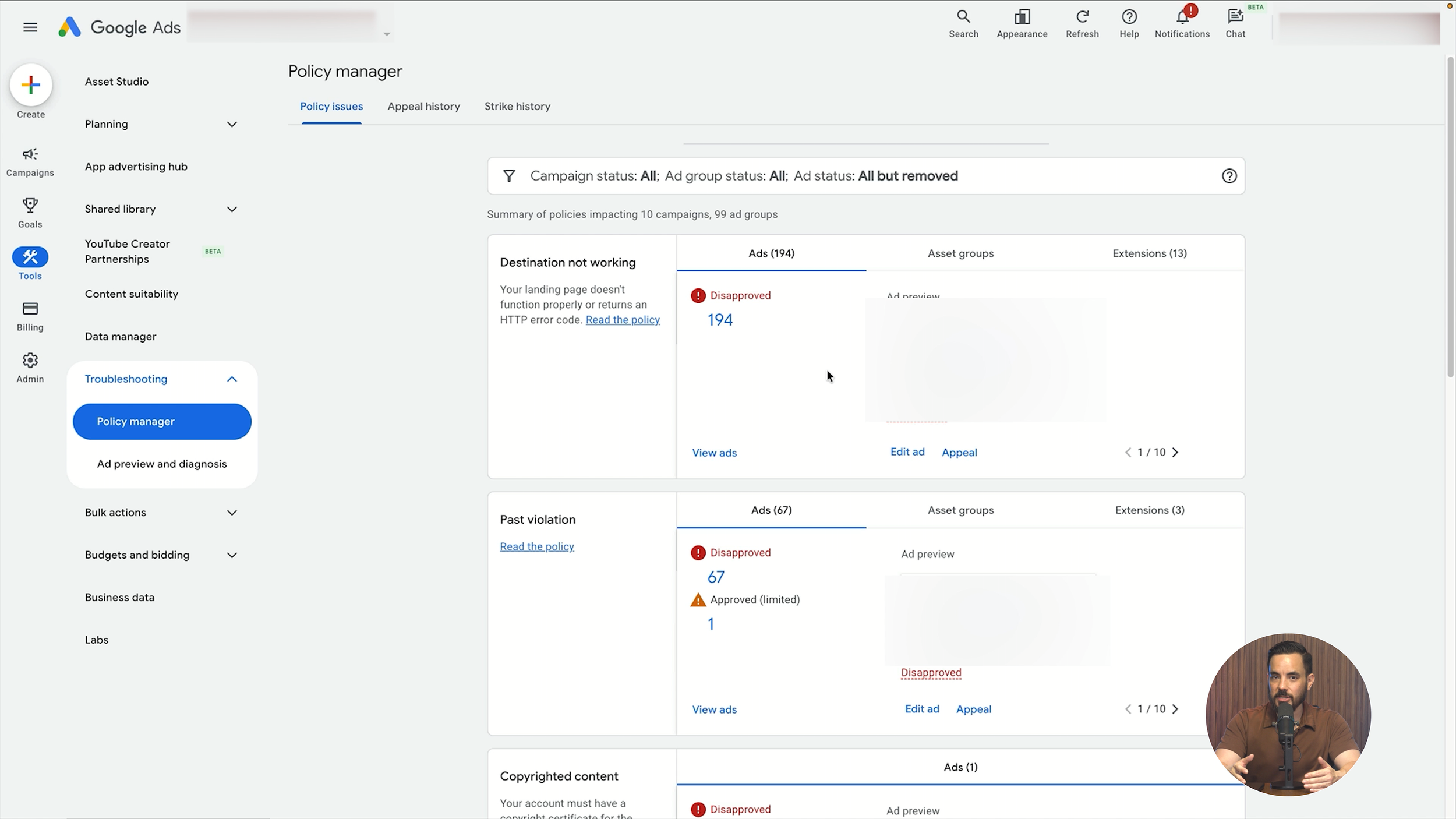
Now click through to the policy page and read it. Properly read it. I know you think you know what it says. Do it anyway, because everything that follows depends on it.
Step Two: Fix It Before You Appeal
Now the most important decision in the whole process. Is Google actually right?
Answer One: Yes, Google Has A Point
Maybe your ad copy makes a health claim you cannot back up, or your landing page is missing something the policy requires. Fix it first. Do not appeal an ad that is genuinely in breach and hope Google doesn't notice. Edit it, make it compliant, then appeal.
Answer Two: No, Google Is Wrong
You are genuinely compliant and the machine has made a bad call. That happens all the time, so appeal as-is, without changing anything.
Either way, you read the policy before touching the button. That is the whole shift from my old advice. The button deserves to be first now, because response times are massively faster and appeals more often produce a result. Just don't hit it willy-nilly.
You Only Have Three Appeals, So Make Them Count
Google allows a maximum of three appeals per ad. Three. After your third unsuccessful appeal the in-account route closes and support is your only way through.
Two more rules stack on top.
Timing. Leave at least 24 hours between appeals on the same ads. Appeal inside that window and it comes back marked "Duplicate", which achieves nothing and risks an attempt.
Volume. Mass-appeal everything repeatedly and Google can suspend your account until you contact support. You have turned one disapproved ad into a much bigger problem.
Three attempts, 24 hours apart, no mass spamming. Treat appeals like they are expensive, because they are.
Step Three: How To Actually Appeal
Two places to appeal from.
Policy Manager, on the Policy Issues tab, where you find the ad and hit Appeal.
Or your ads page, where hovering over the disapproval text pops a box with an Appeal button.
Google then asks you to pick a reason. "Dispute decision" is for when your ad is compliant and the machine made a mistake. "Made changes to comply with policy" is for when you found something legitimate and fixed it.
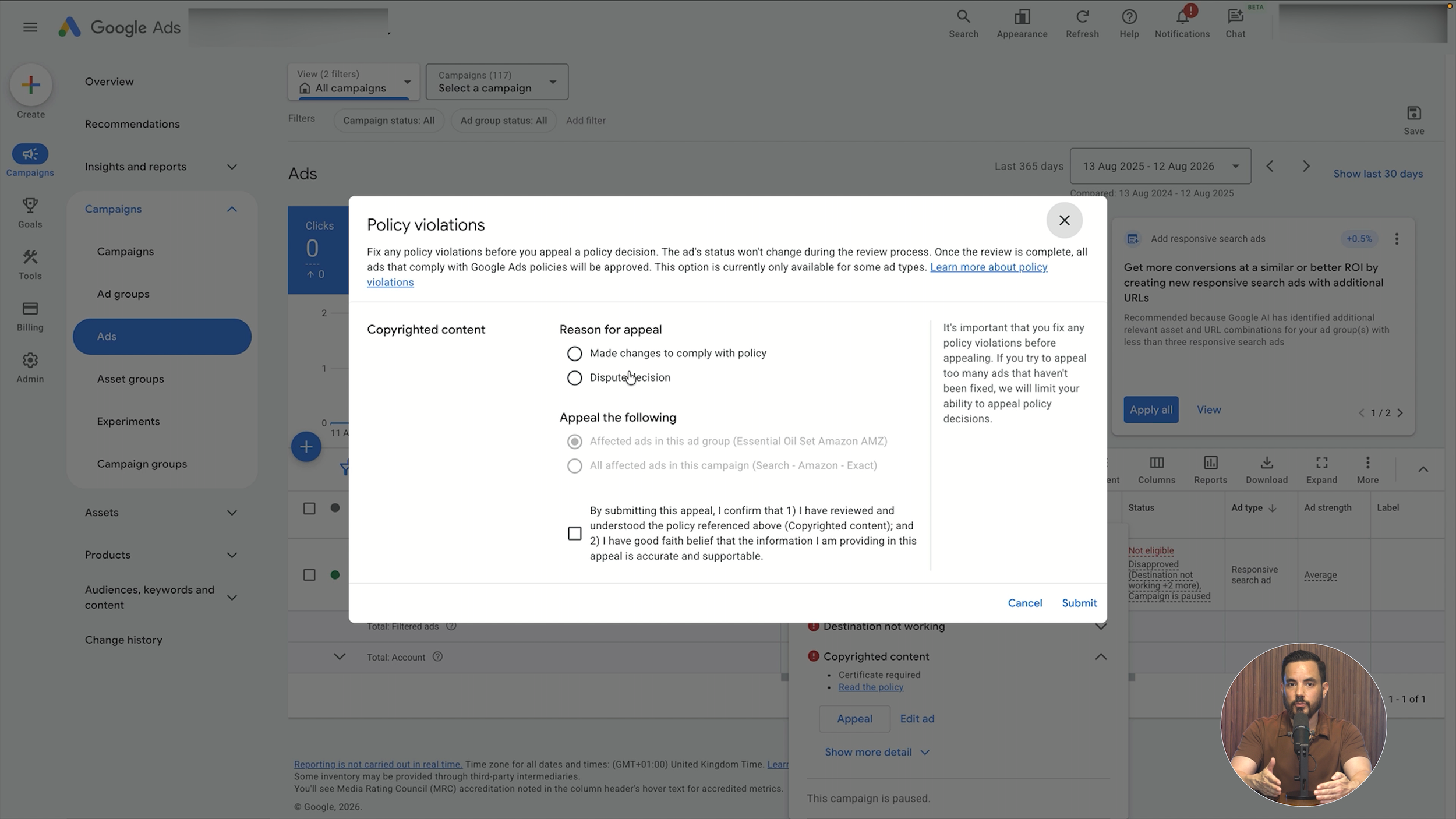
Pick honestly, because if you tell Google you made changes, Google expects to find changes.
Submit and wait. Most reviews now finish inside one business day. Still under review after 48 hours? Time to troubleshoot.
Watch it in Policy Manager under appeal history. "In progress" against anything recent, then a result column: "Successful", "Partially successful" or "Failed". Two you don't want are "Duplicate", meaning you appealed too soon, and "Exceeded retry limit", meaning all three tries are gone.
Appeals are genuinely fast now. The agency StubGroup reported that appeals resolve within 24 hours in 99% of cases they analysed, around 70% faster than before. That is an independent third-party finding, not a Google number, and my team has observed the same. Which is exactly why I switched up the recommended order.
When The Appeal Fails, Do This Instead
Your appeal comes back "Failed". Every instinct says submit again. Don't.
Google's own guidance here is useful and almost nobody follows it. Instead of resubmitting, make a minor edit to the ad. Change some ad text, or tweak the final URL, then save.
Saving an edited ad forces a fresh crawl. Rather than asking the same system to reconsider the same decision, you hand it something new, and a fresh crawl can produce a fresh decision. That one move rescues a lot of ads that looked stuck.
The Six-Month Deadline Google Never Announced
Google recently made a big change to appeal deadlines, and I have to flag it because they released it silently. No blog post, no announcement. They updated a documentation page and that was that.
As of 21 July 2026, you can no longer appeal a policy decision from inside your account if that decision is more than six months old. After that, support is your only route, and Google hasn't published any exception process.
Why that matters today: most accounts I look at have a graveyard of old disapproved ads everyone gave up on years ago. Those disapprovals now have an expiry date on them.
So open Policy Manager, see what is in there, and deal with anything you still care about before the window shuts. If a disapproval is already older than six months, don't waste an appeal. Go straight to support with the template below.
My Fill-In-The-Blanks Message For Google Support
This is where advertisers write a furious paragraph and achieve nothing. So I built a six-part template you can grab here.
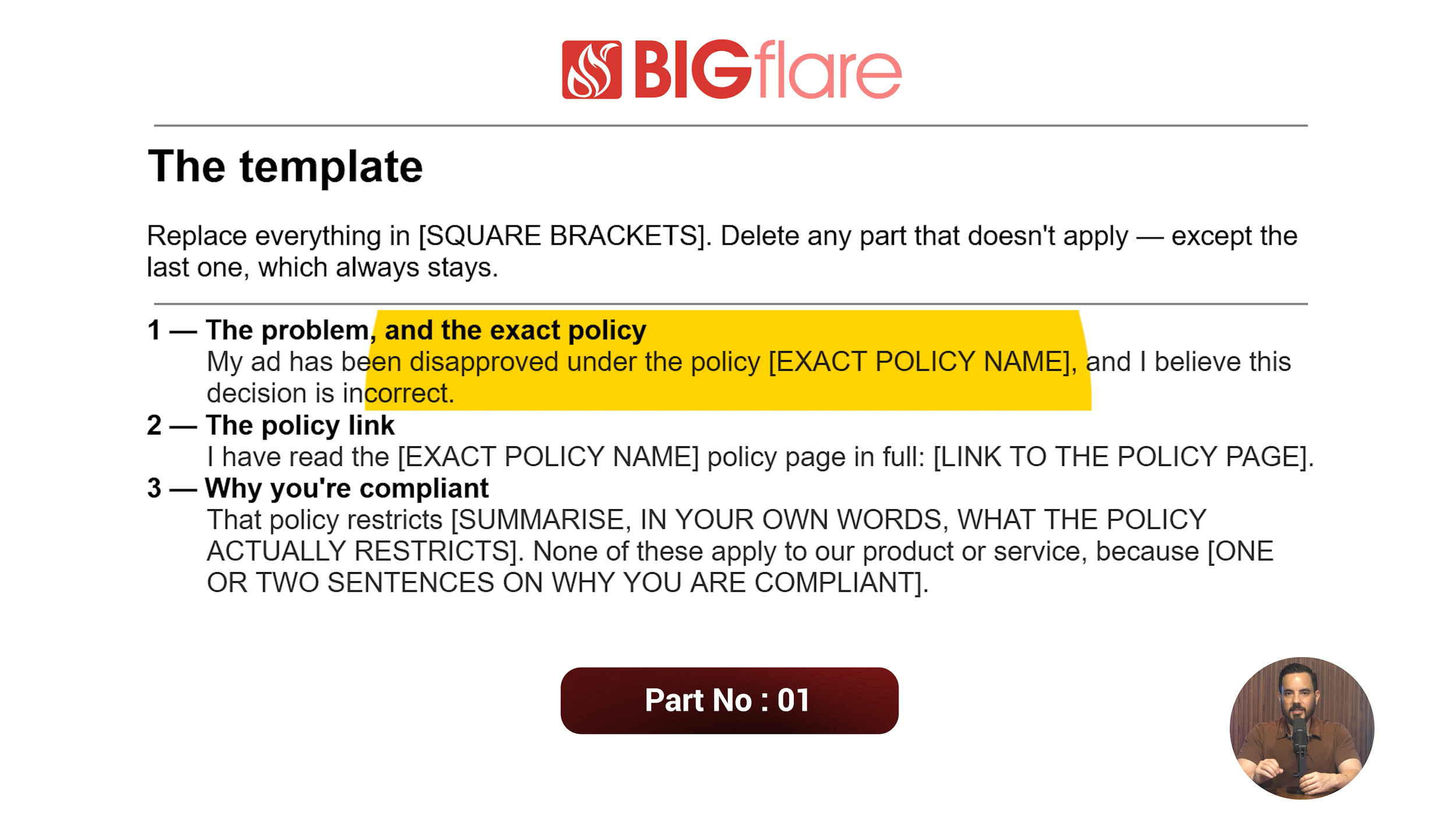
Parts one and two are the exact policy name you were disapproved under, the one you grabbed at the start, plus a link to that policy's page on Google's own site.
Part three demonstrates you have read the policy and states clearly that your product complies. That signals you are not a chancer.
Part four is new since the original version. Describe the corrective action you already took, because if you claim you made changes, you must say exactly what you changed. I removed this claim from headline two. I added this disclaimer to the landing page. Spell it out.
Part five is optional, your insight into why you were wrongly flagged. Optional because it needs real familiarity with your niche. In supplements, advertisers selling legitimate over-the-counter products are often flagged as though they sell prescription drugs. Saying exactly that shows you know your niche.
Part six is the closing line, and the most important one. Leave nothing to the imagination. Explicitly request a manual override, and say that if an override isn't possible, you want the specific detail of exactly what triggered the flag.
That works for a cynical reason. It is often easier for the person at Google to approve you than to work out why the machine flagged you.
You can grab the full template free from the video description.
Why A Google Rep Beats All Of This
If you have a dedicated Google rep, go to them rather than general support. A decent rep can have a disapproval sorted far faster than support ever will.
So who has a rep? Google doesn't publish a spend threshold, so this is my own observation, not policy. Above six figures a month, $100,000 USD and up, a rep will almost always reach out eventually. Below that it is less predictable, but I've seen reps approach advertisers at $50,000 a month and sometimes even $30,000, so anywhere in that $30,000 to $100,000 range, you might.
I know the objection, because I have it too. Reps can be annoying, forever pushing you to broaden targeting and spend more. But in an industry regularly hit with disapprovals, a good rep is genuinely high value. So give them the time of day and build the relationship. They are a bit like health insurance. You don't always need them, but when you do, you will be very glad you kept them around.
Now go and put those ads back live.
Conclusion
Disapprovals are no longer a rare emergency. Google is blocking far more individual ads (8.3 billion) while suspending far fewer accounts (24.9 million), so treat a disapproval as routine account maintenance rather than a crisis.
The updated process runs in this order. First, find the exact policy name, either by hovering over the ad's status or by opening Policy Manager on the Policy Issues tab, then read that policy properly. Second, decide honestly whether Google has a point, and fix any legitimate breach before you appeal. Third, appeal from Policy Manager or the ads page, choosing "Dispute decision" or "Made changes to comply with policy" truthfully.
Guard your three appeals per ad carefully. Leave 24 hours between attempts to avoid a "Duplicate" result, and never mass-appeal, because that can trigger an account suspension. Appeals now resolve within 24 hours in 99% of cases according to StubGroup, roughly 70% faster than before.
If an appeal fails, do not resubmit. Make a minor edit to the ad text or final URL and save it, which forces a fresh crawl and a fresh decision.
Finally, note the silent policy change: since 21 July 2026, in-account appeals are impossible for decisions made more than six months ago. Clear out your old disapproval graveyard now. For anything beyond that window, use the six-part support template, and if you have a dedicated Google rep, use them first.