
Your Performance Max campaigns are flat. You're spending, you're waiting, but the growth just isn't happening.
PMax can feel like a black box, and when results plateau, it's tempting to throw more budget at the problem.
Instead of doing that, I want to share five advanced PMax optimisations I use on client accounts. These strategies have been refined through millions of dollars in ad spend.
1. Find Your Profit Sweet Spot with Profit Curve Bidding
Most advertisers obsess over ROAS without understanding how it relates to profit. Your profit from Performance Max follows a bell curve relationship with return on ad spend.
As you increase your target ROAS, Google reduces your cost per click bids. Lower bids mean less spend and less revenue. Initially, this doesn't matter because profitability climbs faster. But keep pushing that ROAS target higher, and you'll pass the sweet spot where you maximise profit.
I see advertisers make both mistakes. Some go too low because they get excited by higher revenue. Others push too high thinking efficiency is everything. Both end up with less profit.
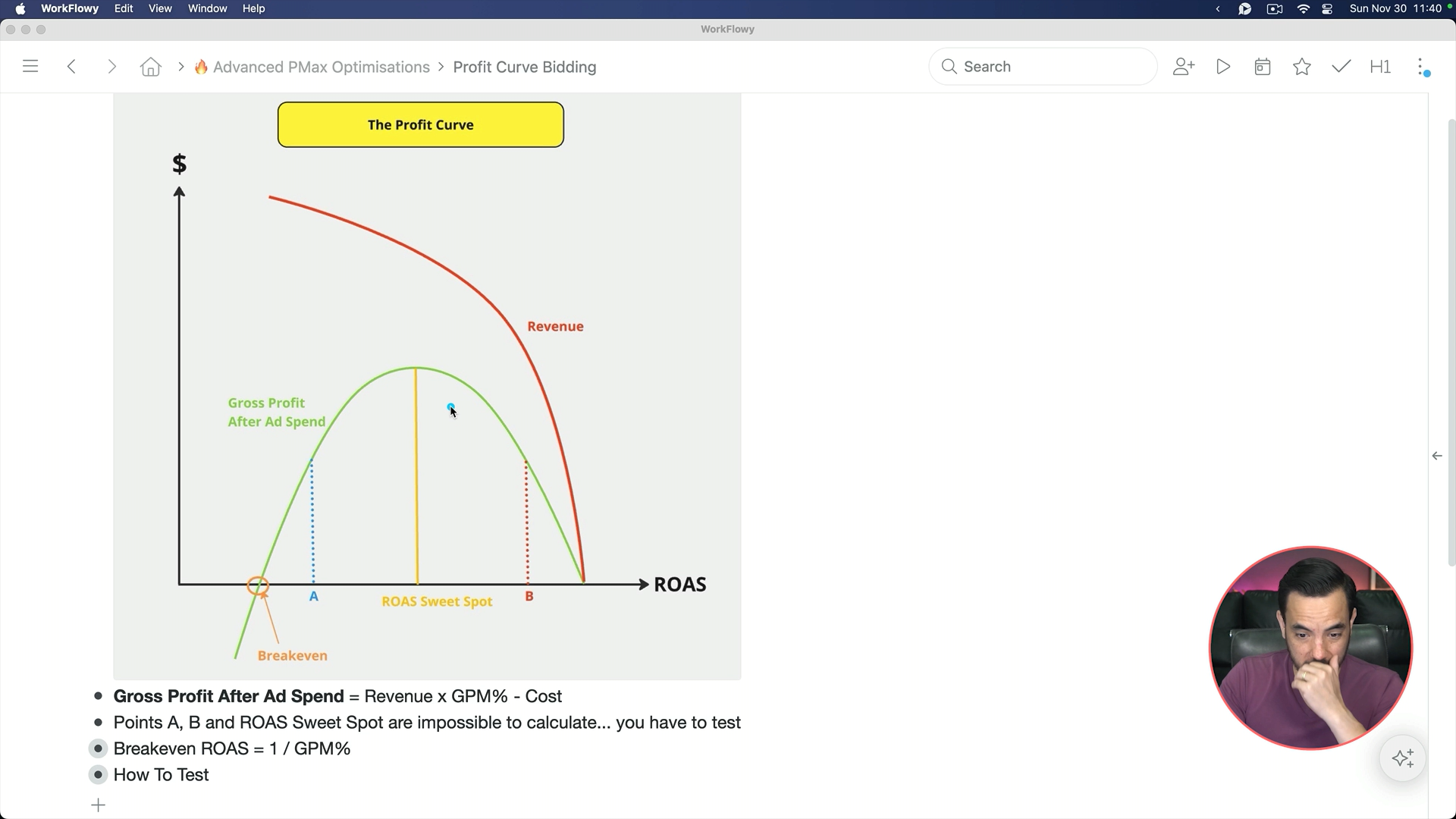
Your breakeven ROAS is 1 divided by your gross profit margin percentage. If your GPM is 50%, breakeven is 200% ROAS. But the profit sweet spot? You can't calculate it. You have to test.
Pick stable months where results are consistent. Run different ROAS targets across consecutive periods: for example 350% in period one, 500% in period two, 750% in period three. Compare actual profit numbers. You might find 350% ROAS generated loads of revenue but lower actual profit, while 500% generated less revenue but a lot more profit. Then zoom in with testing at 450%, 550%, and so on.
2. Campaign Structures That Scale
If your current structure is basic and not set up for growth, restructuring can unlock serious gains.
Gross Profit Margin Tiers
If your products vary significantly in margin (30% to 70%), you need different campaigns for different tiers. A 30% margin product breaks even at 333% ROAS, while a 70% margin product breaks even at 142%. Running everything at the same target means leaving money on the table or losing it.
ROAS Performance-Based Structure
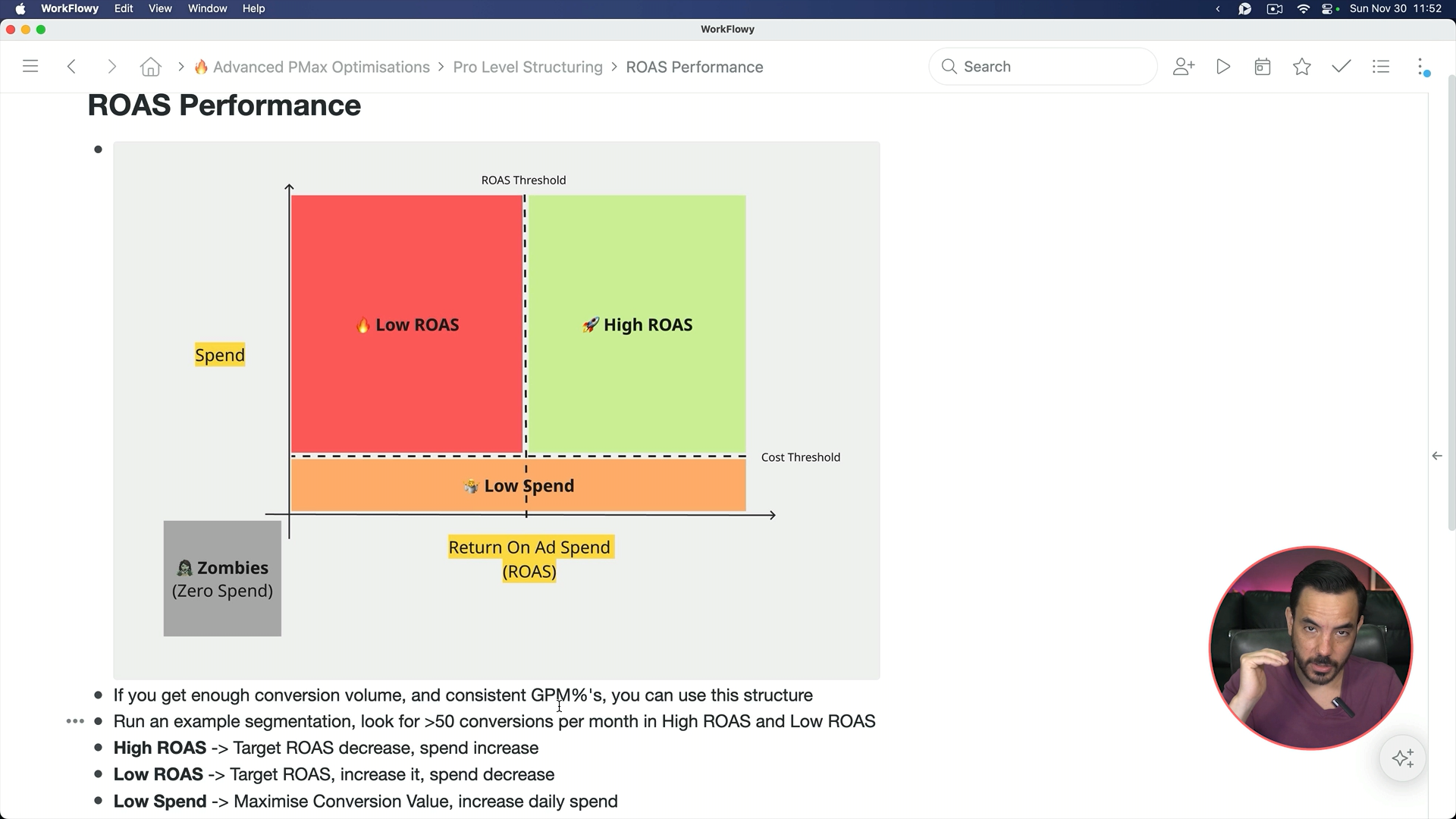
If margins are consistent, run a ROAS performance based structure. Look at product data from the past 90 days. Create a ROAS threshold and cost threshold. Products above both are your winners. Products above cost but below ROAS are dragging down your average.
For high ROAS products, lower the target from historical performance. If they averaged 700%, set 600%. This lets Google spend more on winners. For low ROAS products, raise the target to force better efficiency. Low spend products and zombies (zero spend) should run on maximise conversion value without a target, with budgets to force testing.
The Simplified Version
Just segment products with significant spend (>3-4x your target CPA) performing below breakeven. Put them in their own campaign with a higher ROAS target to stop the bleeding.
3. Shopping Dupes for Testing
This is one of my favourite tactics. Duplicate a product in your feed and change the item ID for example by adding "-dup". Google treats this as a completely different product.
Then change either the title or image. For titles, target new keywords. If your original was "Curly Fern Bread Warmer Basket, Terracotta," the duplicate might become "Artisan Bread Basket with Warming Stone, Rustic Seagrass."
For images, test lifestyle shots against plain white backgrounds. I've seen significant CTR improvements from having a human model using the product. Shopping dupes let you test without risking proven performers.
4. Product Feed Mastery: Three Things That Matter
Your product feed drives the lion's share of ecommerce performance in PMax. Three things matter most: titles, images, and product type.
Titles
I found a shopping result where the title was just "tower fan." You have 150 characters available. A proper title looks like this:
"Best Tower Fan with Remote for Bedroom | Tall Quiet Stand Up Fan | 5 Speeds, 3 Modes, 12-Hour Timer | Smart Floor Fan."
Use Google Keyword Planner and your top converting search terms. Stuff those keywords into your title. For thousands of SKUs, manually optimise best sellers and use AI tools for the rest.
Images
If everyone uses plain white backgrounds, that's your opportunity. Test lifestyle images, models using the product, different settings. Don't assume product-on-white is optimal.
Product Type
Build a four-level deep product type with keywords:
"Home Appliances > Temperature & Climate Control > Standing & Tower Fans > Best Smart Tower Fans with Remote."
After titles, product type has the biggest impact on which keywords you show for.
5. Product Ratings: The Trust Signal
Star ratings on shopping ads matter. You have two options for collecting reviews. Third-party aggregators like Okendo, Judge.me, or Stamps.io are paid but give more control. Google Customer Reviews is free but fiddly.
Judge.me is popular at $15 per month, but only handles product ratings, not seller ratings. For both, you'll also need Google Customer Reviews.
In Google Merchant Center, go to Settings > Add-ons to enable reviews. Connect your aggregator under Products and Store > Reviews > Manage Product Review Sources.
Conclusion
These five optimisations represent high-leverage changes for flat Performance Max campaigns:
Profit curve bidding to find the ROAS target that maximises actual profit
Smart campaign structuring based on margin tiers or ROAS performance
Shopping dupes for testing alternative titles and images safely
Product feed mastery focusing on titles, images, and product type
Product ratings to build trust in competitive shopping results
Start with whichever fits your situation. Pick one, implement it properly, and measure results before moving to the next.