
Most people think you need to spend tens or hundreds of thousands of dollars a month to see any real success with Google Ads. I hear it constantly from ecommerce store owners who assume profitable advertising is out of reach unless they have serious cash to invest.
Here is the truth: you do not need tens or hundreds of thousands of dollars. But you absolutely need a very specific setup.
I have been running Big Flare for over 12 years now, helping hundreds of ecommerce stores scale to seven and eight figures. And the approach I am about to share works whether you are spending $50 a day or $100 a day.
Why Your Small Budget Is Failing
Google's algorithms need data to learn and optimise effectively. When you split a tiny budget across multiple campaigns, none of them receive enough conversions for the algorithm to actually work properly.
I see this mistake constantly. Someone has a $50 per day budget, and they split it across ten different campaigns: brand campaigns, competitor campaigns, generic search, shopping, retargeting, and a full Performance Max campaign with all the bells and whistles.
That is only $5 per day per campaign.
The result? None of those campaigns accumulate enough data. Google's algorithms ideally need around 50 conversions in a 30-day period to learn and optimise effectively. At $5 or $10 a day, most campaigns will never come close to that threshold.
The algorithm cannot learn, your performance suffers, and you end up with ten underperforming campaigns instead of one or two that actually work.
The Solution: Run Just Two Campaigns
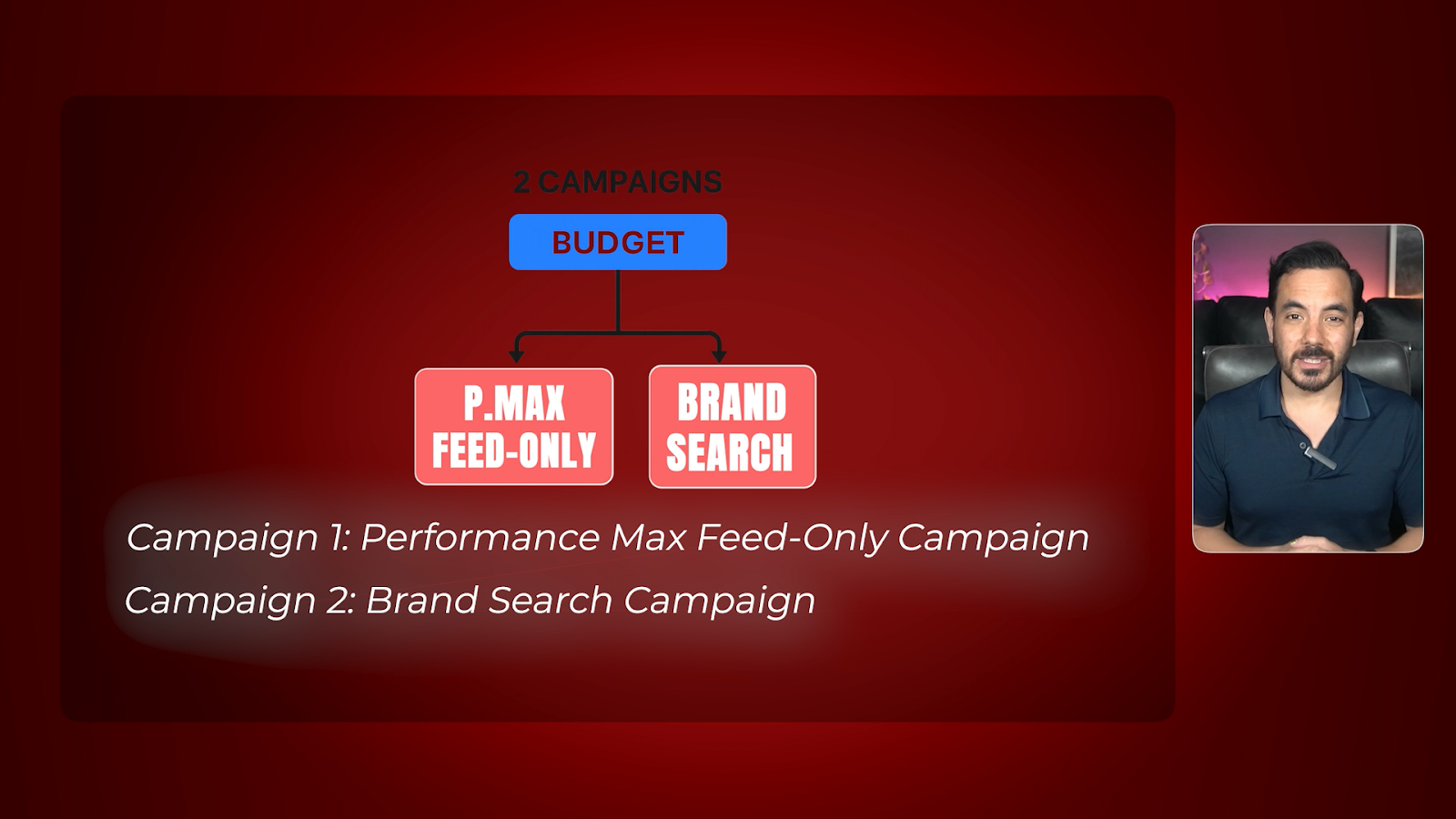
Here is my solution for small budget ecommerce Google Ads success.
You are going to run just two campaigns. That is it.
Campaign One: Performance Max Feed-Only
Campaign Two: Brand Search
For your budget split, I recommend putting 90 to 95 percent of your total budget into the Performance Max feed-only campaign, and 5 to 10 percent into your brand search campaign.
Why does this approach work so well?
First, it concentrates your budget so the algorithm can actually learn. Second, Performance Max feed-only targets the highest purchase intent traffic you can find. Third, your brand campaign captures incremental traffic from people already searching for you. Fourth, this structure is dead simple to manage and optimise.
You are not spreading yourself thin across five different campaign types trying to juggle everything. You have two campaigns, both laser-focused on driving profitable results.
Campaign One: Performance Max Feed-Only Explained
The core strategy here is to run just one Performance Max campaign to concentrate all your data in one place. By running just one PMax campaign, you give the algorithm the best chance to hit that 50-conversion threshold and start optimising properly.
So what does "feed-only" mean?
It means you attach your product feed from Google Merchant Centre, but you do not add any images, videos, headlines, or descriptions into the campaign.
Here is why this matters.
When you run a normal Performance Max campaign with all the creative assets, Google spreads your budget across all the different channels in its network: YouTube, Display, Discover, Gmail, Maps, and Shopping. That is six different places your ads can show.
But when you run feed-only, you stop Google from showing ads on YouTube, Display, Discover, Gmail, and Maps. You force Google to only show Shopping ads.
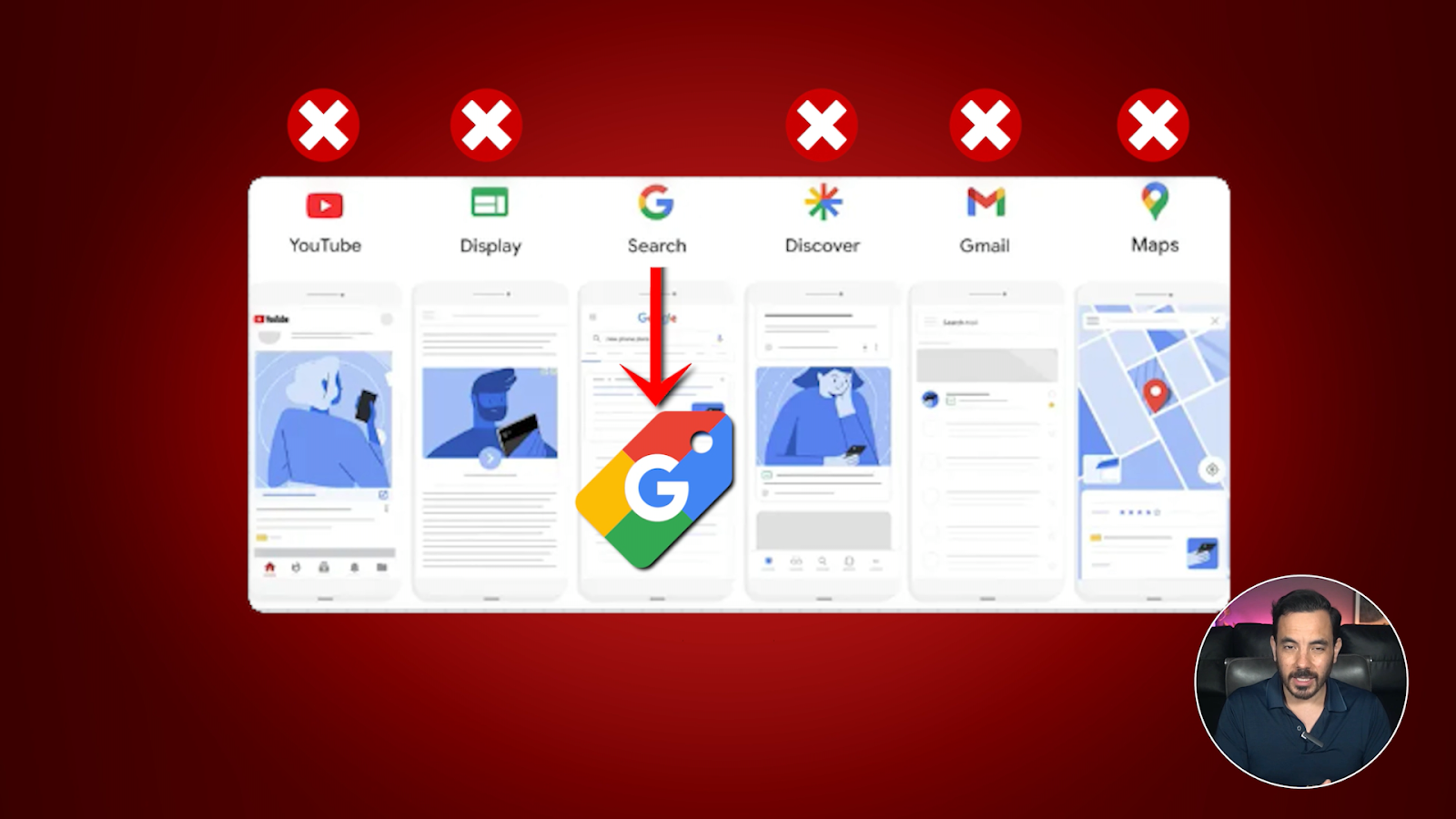
Shopping ads have the highest purchase intent because people are actively looking at products to buy. Concentrating your limited budget on just Shopping traffic means more focused spend and better results faster.
Why Not Standard Shopping?
You might be wondering why not just run a Standard Shopping campaign instead.
Good question. I have tested this extensively on dozens of low-budget accounts at Big Flare, and Performance Max feed-only consistently performs better and faster than Standard Shopping campaigns.
There are two main reasons for this.
First, Performance Max allows you to use the "Maximise Conversion Value" bid strategy right from the start. Standard Shopping campaigns require you to start with manual CPC bidding or Maximise Clicks, and both are far less efficient when you have a small budget.
Second, Performance Max just seems to accumulate more volume than Standard Shopping. Even with identical products and settings, I have observed that PMax feed-only consistently receives more clicks and sales. The observation is there across many clients: PMax feed-only delivers better volume even in an apples-to-apples comparison.
Optimising Your Performance Max Campaign
Product Feed Quality: Your Secret Weapon
Your product title is essentially your keyword targeting for Shopping ads. Google matches search queries to the words in your product titles. Better titles mean more relevant traffic, which means higher conversion rates and better return on ad spend.
Poor title: "Nike Pegasus Shoes"
Good title: "Nike Pegasus Men's Running Shoes | Cushioned Sneakers for Road Running, Walking, Workouts | Black Grey Athletic Footwear"
The good title includes brand name, specific product type, key features and benefits, colour variants, use case, and relevant synonyms.
Key elements to include in every product title:
Brand name (not necessarily first)
Specific product type, not just a generic description
Key features and benefits
Colour, size, and other relevant attributes
Use case or category
Relevant synonyms people might search for
Where do you optimise these product titles? Customise them in your feed, not on your website. You can do this directly in the Google Merchant Centre feed editor, or use a feed management app like DataFeedWatch or GoDataFeed.
Asset Group Structure: Visibility and Control
Set up asset groups by product category. If you sell shoes, you might have asset groups for men's shoes, women's shoes, and kids' shoes. Or segment by shoe type: running shoes, casual shoes, and formal shoes.
Here is something important to understand: when you are running feed-only Performance Max, the asset group structure does not directly impact your ad performance. The algorithm does what it does regardless of how you structure things.
So why bother structuring by category? Two main reasons.
First, you gain performance visibility at the category level. You can see which product categories are driving results and which are not.
Second, you gain control to turn categories on and off. If you see a particular category underperforming, simply turn off that asset group.
Pro strategy: Give your best-selling products their own dedicated asset group. This allows you to track top performers with laser precision.
I recommend starting with two to four asset groups maximum. One for your best sellers, and one to three for your main product categories. You can always add more later once you are seeing success.
Campaign Two: Brand Search
You might be thinking: do I really need a brand campaign?
Yes. Various industry studies have shown that your organic brand listings only achieve a 30 to 50 percent click-through rate. That means 50 to 70 percent of people searching for your brand do not click on your organic listing.
Your branded search ads capture those searchers who scroll past the organic results. That is significant incremental traffic and sales you would miss without a brand campaign.
And here is the beautiful part: the economics are fantastic. Brand clicks are cheap, conversion rates are extremely high, and typical ROAS on brand campaigns is 1000% or more. That is a 10x return or better, and you only need 5 to 10 percent of your total budget.
Setting Up Your Brand Campaign
Create a new Search campaign with the sales objective. Add brand keywords in both exact match and phrase match, including common misspellings. Write simple text ads with brand-focused messaging and add sitelinks for popular pages: homepage, best sellers, contact, and shipping information. Aim for 10 to 20 sitelinks because the more options you give Google, the better your CTR.
Launching for Maximum Success
For both campaigns, begin with "Focus on Conversion Value" and no Target ROAS set yet.
Why start with these no-target bid strategies instead of setting targets right away?
Because you need data first before you can set meaningful targets. The algorithms need to learn what good performance looks like in your account before you can tell them to hit specific numbers.
Your key milestone: 50 conversions in your Performance Max campaign. This is the threshold where Google's algorithm has enough data to really start optimising effectively. Depending on your budget and conversion rate, this usually takes 30 to 60 days. Be patient during this learning phase.
Once you have hit 50 conversions consistently, switch from "Maximise Conversion Value" to "Target ROAS." Set your initial target based on your historical ROAS from the learning phase. If you averaged 300 percent ROAS during your first 50 conversions, start with a Target ROAS of about 300 percent.
Pro tip for maximising early ROAS: Start with only your best-selling products in the feed. Pause other asset groups and leave only your best sellers running. This concentrates your limited budget on proven winners. Once profitable, gradually enable the rest of your catalogue.
What Not to Do
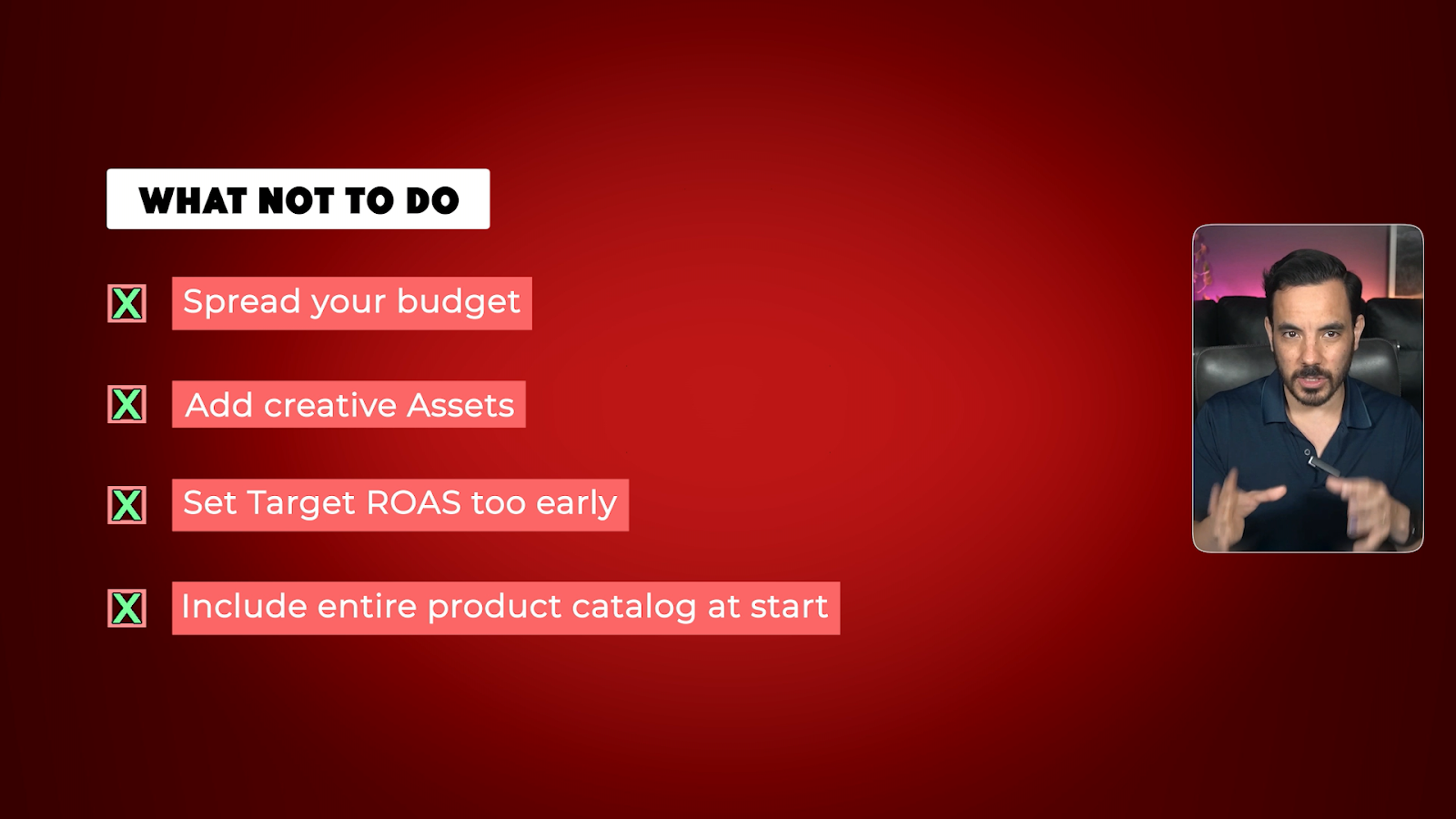
Do not spread your budget across five or more campaigns
Do not add creative assets to your Performance Max campaign initially; keep it feed-only for maximum Shopping ad focus
Do not set a Target ROAS too early before you have hit that 50-conversion threshold
Do not include your entire product catalogue at the start; begin with just your best sellers
The Success Metrics That Matter
Four metrics will tell you everything you need to know about whether your small budget setup is working:
Conversions: Goal of 50 conversions in 30 days
ROAS: In Google Ads, this is called "Conv. Value / Cost"
Total Cost: Your overall account spend
Conversion Value: The revenue coming in for that total ad spend
That is the small budget formula. Two campaigns, concentrated budget, feed-only focus, and patience to reach that 50-conversion milestone. Simple, effective, and I have seen it deliver profitable results for store owners spending as little as $50 a day.
Conclusion
Running profitable Google Ads on a small budget comes down to concentration rather than diversification. Focus everything on just two campaigns: a Performance Max feed-only campaign (90-95% of budget) and a brand search campaign (5-10%).
The feed-only approach forces Google to show only Shopping ads. Optimise your product titles in your feed to improve targeting. Structure asset groups by category for visibility and control.
Launch with "Maximise Conversion Value" bidding and no targets. Wait until you reach 50 conversions before switching to Target ROAS. Focus on your best sellers first, then expand once profitable.